CT094-3-3-WMSS · Chapter 04
Operational Support and Wireless Convergence
Learning outcomes
- List the features of a secure and scalable wireless local area network
- Describe the functions of wireless operational support
- Explain WLAN, WiMAX, 3G, 4G and 5G convergence
Topic structure
- Features of a Scalable and Secure WLAN
- WLAN Operational Support
- The Convergence of Wireless Technologies
Key terms
WiMAXWLAN EncryptionWIDS/WIPSWLAN Handoff1G/2G/2.5G/3G/4G/5G
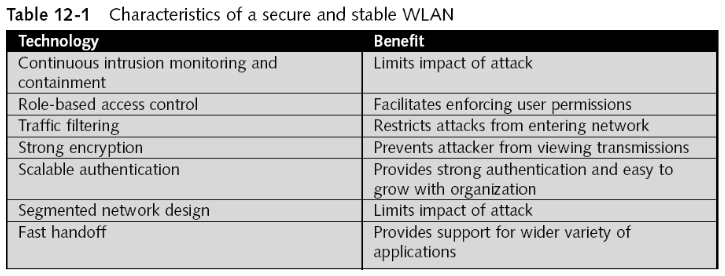
Features of a Stable and Secure WLANslide 5
- Scalable
- Able to accommodate growth
- WLAN that has been designed from the outset to be secure and scalable
- Will provide a solid foundation from which attacks can be thwarted and users can feel confident
Continuous Intrusion Monitoring and Containmentslides 6–7
- One of the most important elements in a scalable and secure WLAN
- Monitoring a WLAN can be accomplished via:
- A standard network management protocol
- A system specifically designed for wireless networks
- Dedicated WLAN management systems
- Use discovery tools to continuously monitor the RF for attacks
- Other solutions for continuous monitoring of a WLAN
- Wireless intrusion detection system (WIDS)
- Wireless intrusion prevention system (WIPS)
Role-Based Access Controlslide 8
- Wireless authentication
- Verifies that the person requesting access to the network is who they claim to be
- Access control
- Mechanism for limiting access to resources
- Based on the users’ identities and their membership in various groups
- Mechanism for limiting access to resources
- Role-based access control
- Easier to establish permissions based on job classification
- Considered a major step in keeping a WLAN secure
Traffic Filteringslide 9
- Restricts network traffic based on specific criteria
- Basic types of filters
- Address filtering
- Data filtering
- Protocol filtering
- APs can be configured to filter traffic
- Difficult for an attacker to circumvent
Strong Encryptionslide 10
- At the heart of any secure WLAN is strong encryption
- WLAN encryption options
- Wired equivalent privacy (WEP)
- IEEE 802.11i
- Wi-Fi Protected Access (WPA)
- Wi-Fi Protected Access 2 (WPA2)
- A secure WLAN should use WPA2 for its encryption
Scalable Authenticationslide 11
- Strong authentication that has the ability to grow
- Another essential element in a secure and scalable WLAN
- WPA Enterprise and WPA2 Enterprise models
- Utilize IEEE 802.1x port-based authentication: Enhancing network security by enabling authentication and authorization at the network access level.
- RADIUS (Remote Authentication Dial-In User Service)
- It has become the preferred scalable wireless authentication solution
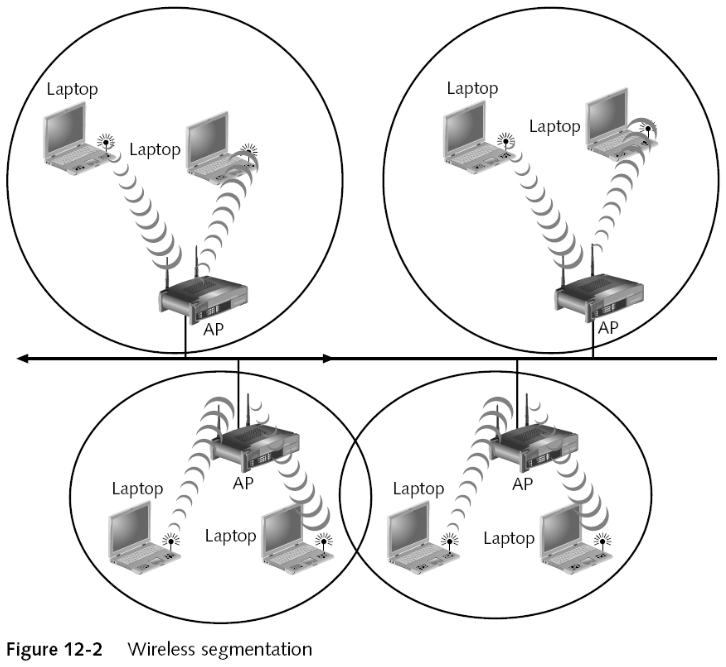
Segmented Network Designslides 12–13
- Segmentation
- Dividing the network into smaller units
- Wireless segmentation options
- Wireless gateways
- Wireless routers
- Wireless switches
- Firewalls
- Demilitarized zones
- Network address translation
- Virtual local area network (VLAN)
Fast Handoffslides 14–15
- Original 802.11 standard
- Did not specify how communications were to take place between APs
- To support roaming users
- Did not specify how communications were to take place between APs
- IEEE 802.11F
- Specified information that access points need to exchange to support WLAN roaming
- IEEE 802.11r or fast handoff
- Allows a wireless client to determine the quality of service (QoS) and security being used At a different AP before making the transition
WLAN Operational Supportslide 16
- No network functions on its own
- There must be operational support
- To ensure its continued functionality and reliability
- Basic tasks
- Monitoring
- Configuration management
- User training
Monitoringslide 17
- Monitoring tools for wired networks do not accurately detect:
- RF interference
- Jamming
- Location of APs
- Identification of unauthorized users
- WLAN monitoring tools can be used to identify:
- AP settings
- Coverage
- Network performance
- Security audit
Configuration Managementslide 18
- Controls changes made to WLAN after installation
- Types of changes
- Applications
- Coverage area
- RF channel
- Security
- Transmit power
- Change request form
- Outlines the requested alteration
Education and Trainingslides 19–21
- Computer users share responsibility for protecting the assets of an organization
- Users need to receive training regarding:
- Importance of securing information
- Roles that they play in security
- Necessary steps they need to take toward attacks
- Training must be ongoing
- User awareness is an essential element of security
- Organizations should provide education and training at set times and on an ad hoc basis
- Opportunities for education and training
- A new employee is hired
- A computer attack has occurred
- An employee is promoted or given new responsibilities
- A department is conducting an annual retreat
- New user software is installed
- User hardware is upgraded
- One challenge of security education and training
- Understand how individuals learn
- Learning resources
- An organization can provide educational content in several ways
- Seminars and workshops
- Print media
- Internet information
- Can be used in a daily basis
- An organization can provide educational content in several ways
The Convergence of Wireless Technologiesslide 22
- Convergence of wireless technology is most evident today in the blending of wireless LANs with wireless WANs
- Technologies supporting this unification besides WLAN
- WiMAX
- Cellular 3G,4G,5G
WiMAXslides 23–25
- WiMAX (Worldwide Interoperability for Microwave Access)
- Based on the IEEE 802.16 standard
- Fixed WiMAX
- Officially IEEE 802.16-2004
- Provides up to 50 kilometers (31 miles) of linear service range
- And is not line-of-sight dependent
- Provides shared data rates up to 70 - 100 Mbps
- MAC layer uses a scheduling system
- Allows the base station to control QoS
- Fixed WiMAX
- Application categories
- High-speed enterprise connectivity for business
- Last mile connection
- Connection that begins at a fast ISP and ends at the home or office
- Application categories
- Mobile WiMAX
- Adds mobility components to Fixed WiMAX
- Allows users to freely roam both indoors and outdoors for kilometers while remaining connected
- Mobile WiMAX
- Competing standards
- IEEE 802.16e
- Extension of IEEE 802.16-2004
- IEEE 802.20
- Would permit users to roam up to 15 kilometers and at speeds up to 250 kilometers per hour
- IEEE 802.16e
- Competing standards
1,2,3,4 & 5 Gslide 26
- First Generation (1G)
- Transmitted at 9.6 Kbps using analog circuit-switch technology
- A dedicated and direct physical connection is made between the caller and the recipient
- Can only be used for voice communications
- Transmitted at 9.6 Kbps using analog circuit-switch technology
- Second Generation (2G)
- Used circuit-switched digital networks
- Digital transmission advantages
- Uses the frequency spectrum more efficiently
- Quality of the voice transmission does not degrade
2Gslide 27
- Second Generation (2G)
- Digital transmission advantages
- Difficult to decode and offers better security
- Uses less transmitter power
- Enables smaller and less expensive individual receivers and transmitters
- Digital transmission advantages
- 2.5 Generation (2.5G)
- Interim step between 2G and 3G
- 2.5G networks operate at a max speed of 384 Kbps
- 2.5G networks are packet-switched
3Gslides 28–29
- 2.5 Generation (2.5G)
- Ideal for voice communications
- Not efficient for data transmission
- Packet switching requires that the data transmission be broken into smaller units of packets
- Each packet is sent independently through the network
- Data transmissions occur in “bursts”
- Third Generation (3G)
- Throughput rates for 3G averaging between 400 Kbps and 700 Kbps
- Third Generation (3G)
- Can be used for wireless data communications
- Mobile wireless data convergence
- WLANs, WiMAX, and 3G may all be used together to provide wireless data services
- WLAN hotspots continue to spread
- Intel chipsets are available for laptop manufacturers
- That incorporate WiMAX connectivity
- “Road warriors” are installing combination 3G+WLAN PC Cards
4Gslide 30
- The 4G architecture basically build upon 3G or can say that it is a extension of 3G wireless technology.
- In 4G, the majority of the traffic is data and multimedia as opposed to voice only.
- Data rates in 4G systems will range from 20 to 100 Mbps.
- 4G LTE means fourth generation long term evolution. LTE is a kind of 4G that provides fastest connection to mobile Internet experience-10 times faster than 3G.
- The terms 4G and 4G LTE are often used by people interchangeably, but they are not the same.
5Gslide 31
- 5G is the fifth generation technology standard for broadband cellular networks which began deploying worldwide in 2019.
- Predicted to have more than 1.7 billion subscribers worldwide by 2025
- 5G service area is divided into small geographical areas called cells. All 5G wireless devices in a cell are connected to the Internet and telephone network by radio waves through a local antenna in the cell.
- The main advantage of the new networks is that they will have greater bandwidth, giving higher download speeds, eventually up to 10 gigabits per second (Gbit/s).
- 4G cellphones are not able to use the new networks, which require 5G enabled wireless devices.
Quick review questions
- In brief, list down the features of a secure and scalable wireless local area network
- Describe the functions of wireless operational support
- Explain in brief WLAN, WiMAX, and 3G convergence
Summary of main teaching points
- Designing and building a secure and scalable wireless LAN
- Essential foundation for operational support of the network
- Operational support for a WLAN involves:
- Monitoring
- Configuration management
- Education and training
- Different wireless technologies are converging to create a seamless wireless mobility experience for mobile users
- Technologies include:
- WLAN
- WiMAX
- 3G