CT094-3-3-WMSS · Chapter 05
Wireless LAN Vulnerabilities
Learning outcomes
- Explain the main IEEE 802.11 security protections
- Describe the vulnerabilities of IEEE 802.11 authentication
- Tell how address filtering is limited
- List the vulnerabilities of WEP
Topic structure
- Basic IEEE 802.11 Security Protections
- Authentication
- Vulnerabilities of IEEE 802.11 Security
- Address Filtering
- Dynamic WEP
Key terms
IEEE 802.11 securityMAC addressMAC address filteringWEPRC4
Basic IEEE 802.11 Security Protectionsslide 5
- Protections can be divided into three categories
- Access control
- Wired equivalent privacy (WEP)
- Authentication
Access Controlslides 6–12
- Method of restricting access to resources
- Intended to guard the availability of information
- By making it accessible only to authorized users
- Accomplished by limiting a device’s access to the access point (AP)
- Almost all wireless APs implement access control
- Through Media Access Control (MAC) address filtering
- Implementing restrictions
- A device can be permitted into the network
- A device can be prevented from the network
- MAC address filtering should not be confused with access restrictions
- Access restrictions can limit user access to Internet
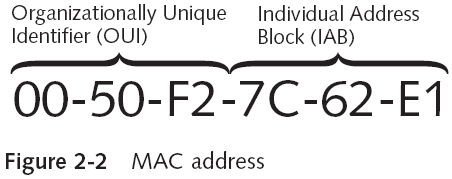
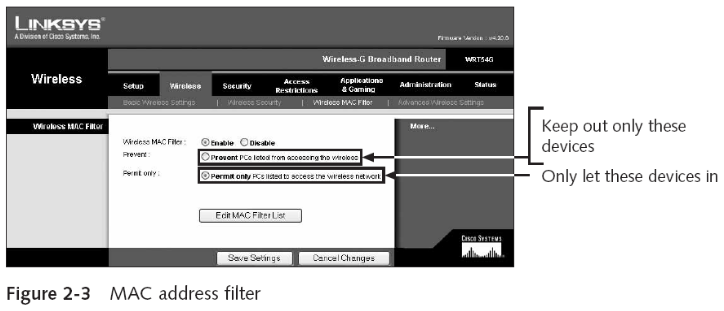
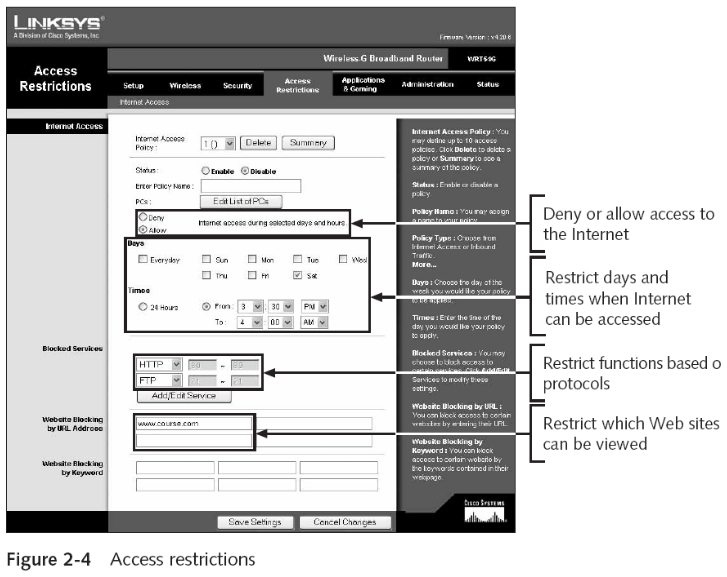
- MAC address filtering
- Considered a basic means of controlling access
- Requires pre-approved authentication
- Makes it difficult to provide temporary access for “guest” devices
- Please note that MAC Address Filtering provides No strong Security
- So far, this sounds pretty good. But MAC addresses can be easily spoofed in many operating systems, so any device could pretend to have one of those allowed, unique MAC addresses.
Wired Equivalent Privacy (WEP)slides 13–17
- Intended to guard confidentiality
- Ensures that only authorized parties can view the information
- WEP accomplishes confidentiality by “scrambling” the wireless data as it is transmitted
- Used in IEEE 802.11 to encrypt wireless transmissions
- Cryptography
- Science of transforming information so that it is secure while it is being transmitted or stored
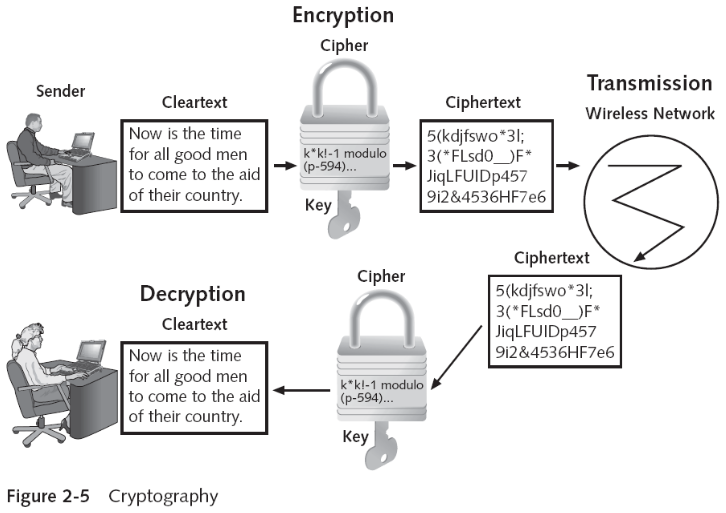
- WEP implementation
- WEP was designed to meet the following criteria:
- Efficient
- Exportable
- Optional
- Reasonably strong
- Self-synchronizing
- WEP relies on a secret key shared between a wireless client device and the access point
- Private key cryptography or symmetric encryption
- WEP was designed to meet the following criteria:
- WEP implementation
- Options for creating keys
- 64-bit key
- 128-bit key
- Passphrase
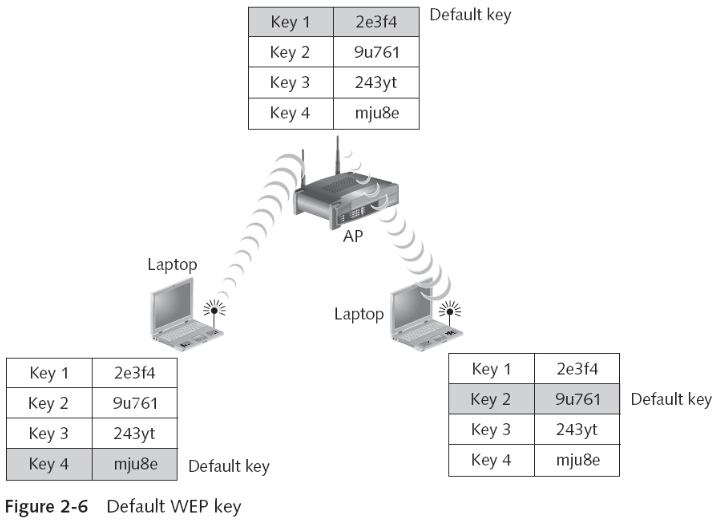
- APs and devices can hold up to four shared secret keys
- One of which must be designated as the default key
- Options for creating keys
Authenticationslides 18–20
- Devices connected to a wired network are assumed to be authentic
- Wireless authentication requires the wireless device to be authenticated
- Prior to being connected to the network
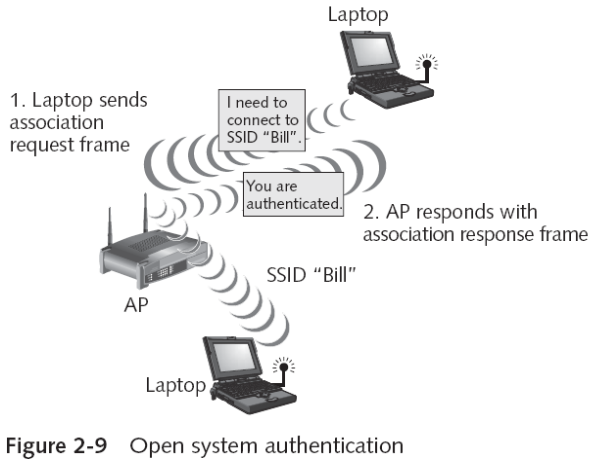
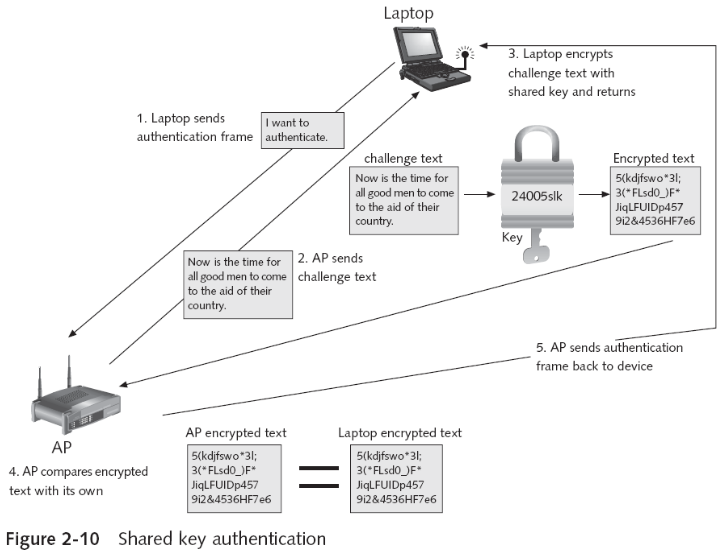
- Types of authentication supported by 802.11
- Open system authentication
- Shared key authentication
- Captive portal authentication is not specifically defined or standardized within the IEEE 802.11 family of standards. A captive portal is a web page that is displayed to users when they attempt to connect to a public Wi-Fi network or other network, typically in a public place like an airport, hotel, or café. It is usually implemented at the application layer (Layer 7 of the OSI model) using standard web technologies like HTTP and HTML
Vulnerabilities of IEEE 802.11 Securityslide 21
- 802.11 security mechanisms for wireless networks
- Proved to provide a very weak level of security
Open system authentication vulnerabilitiesslides 22–26
- Authentication is based on a match of SSIDs
- Several ways that SSIDs can be discovered
- Beaconing
- At regular intervals the AP sends a beacon frame
- Scanning
- Wireless device is set to look for those beacon frames
- Beacon frames contain the SSID of the WLAN
- Wireless security sources encourage users to disable SSID broadcast
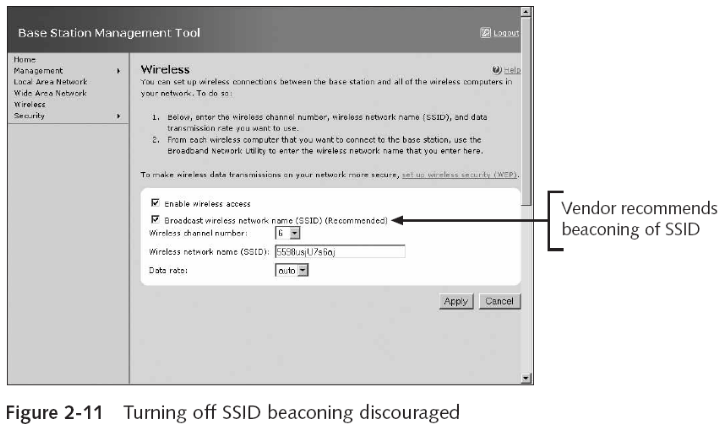
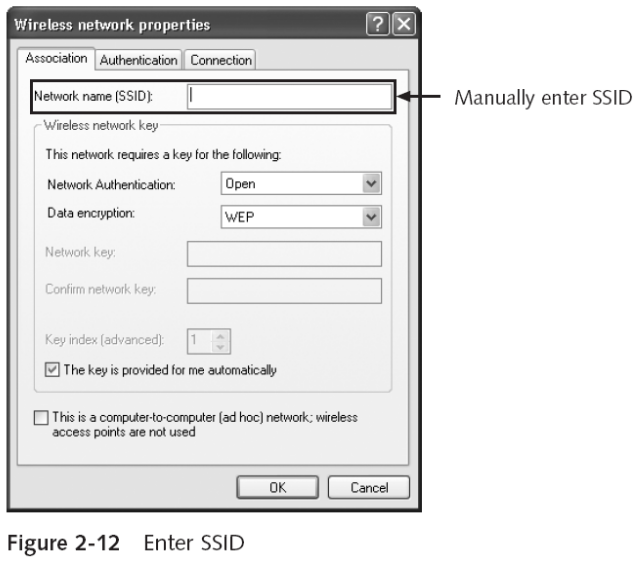
- Not always possible or convenient to turn off beaconing the SSID
- Prevents wireless devices from freely roaming
- Roaming facilitates movement between cells
- When using Microsoft Windows XP / Win10
- Device will always connect to the AP broadcasting its SSID
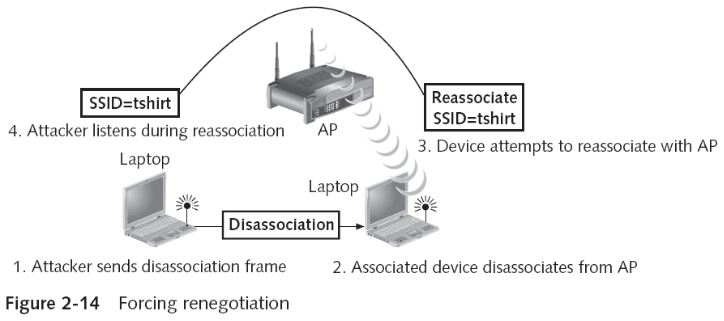
- SSID can be easily discovered even when it is not contained in beacon frames
- It is transmitted in other management frames sent by the AP
- Prevents wireless devices from freely roaming
Shared key authentication vulnerabilitiesslides 27–28
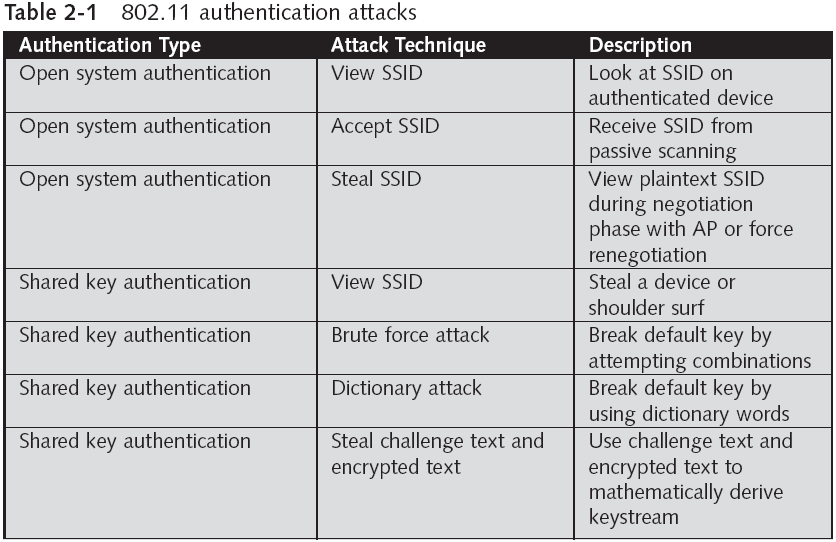
- Key management can be very difficult when it must support a large number of wireless devices.
- Attacker can “shoulder surf” the key from an approved device
- Types of attacks
- Brute force attack
- Dictionary attack
- Attacker can capture the challenge text along with the device’s response (encrypted text and IV)
- Can then mathematically derive the keystream
Address Filteringslides 29–30
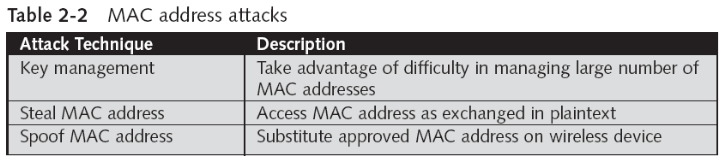
- Managing a larger number of MAC addresses can pose significant challenges
- Does not provide a means to temporarily allow a guest user to access the network
- MAC addresses are initially exchanged in plaintext
- Attacker can easily see the MAC address of an approved device and use it
- MAC address can be “spoofed” or substituted
WEPslides 31–32
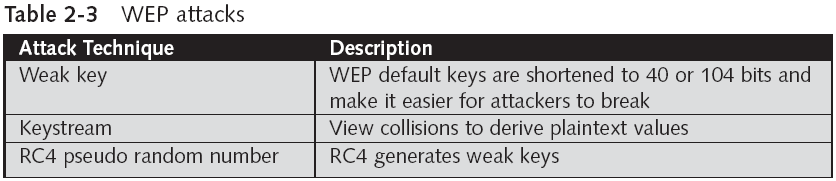
- RC4 issues
- RC4 uses a pseudo random number generator (PRNG) to create the keystream
- PRNG does not create a true random number
- First 256 bytes of the RC4 cipher can be determined
- By bytes in the key itself
- RC4 source code (or a derivation) has been revealed
- Attackers can see how the keystream itself is generated
- RC4 uses a pseudo random number generator (PRNG) to create the keystream
- WEP attack tools
- AirSnort, Aircrack, ChopChop WEP Cracker, and WEP Crack
WEP2slide 33
- Attempted to overcome the limitations of WEP by adding two new security enhancements
- Shared secret key was increased to 128 bits
- To address the weakness of encryption
- Kerberos authentication system was used
- Shared secret key was increased to 128 bits
- Kerberos
- Developed by Massachusetts Institute of Technology
- Used to verify the identity of network users
- Based on tickets
- WEP2 was no more secure than WEP itself
Dynamic WEPslide 34
- Solves the weak initialization vector (IV) problem
- By rotating the keys frequently
- Uses different keys for unicast traffic and broadcast traffic
- Advantage
- Can be implemented without upgrading device drivers or AP firmware
- Deploying dynamic WEP is a no-cost solution with minimal effort
- Dynamic WEP is still only a partial solution
Quick review questions
- Explain in brief the main IEEE 802.11 security protections
- List the vulnerabilities of IEEE 802.11 authentication
- How address filtering is limited?
- List the vulnerabilities of WEP
Summary of main teaching points
- It was important that basic wireless security protections be built into WLANs
- Protection categories: access control, WEP, and authentication
- Wireless access control is accomplished by limiting a device’s access to the AP
- WEP is intended to ensure that only authorized parties can view the information
- Wireless authentication requires the wireless device to be authenticated prior to connection to the network
- Security vulnerabilities exposed wireless networking to a variety of attacks
- WEP implementation violates the cardinal rule of cryptography
- Avoid anything that creates a detectable pattern
- WEP2 and dynamic WEP were both designed to overcome the weaknesses of WEP
- Each proved to have its own limitations
- They were never widely implemented