CT094-3-3-WMSS · Chapter 07
Active Wireless Attacks
Learning outcomes
- Describe the basic vulnerabilities of a WLAN
- Tell how malware and spyware can infect wireless networks
- List the vulnerabilities involved with implementing unsecured wireless LANs
- Explain the different types of wireless infrastructure attacks
Topic structure
- Security Vulnerabilities
- Wireless Infrastructure Attacks
Key terms
WLANs VulnerabilitiesRogue Access PointsPeer-to-peer attacksDoS
Security Vulnerabilitiesslide 5
- Security vulnerability
- Weakness or flaw in an information system
- Could be exploited to cause harm
- Describes the points of risk regarding the penetration of a security defense
- Categories
- Basic vulnerabilities
- Vulnerabilities when using a public-access WLAN
- Vulnerabilities associated with implementing an unsecured wireless network
Basic Vulnerabilitiesslides 6–19
- Default passwords
- Authentication
- Users must prove that they are who they claim to be
- Based on what they have, know, or are
- Users must prove that they are who they claim to be
- Password
- Secret combination of letters and numbers
- Validates or authenticates a user by what she knows
- Used with user names to log on to a computer
- APs are protected by manufacturers with default passwords
- Authentication
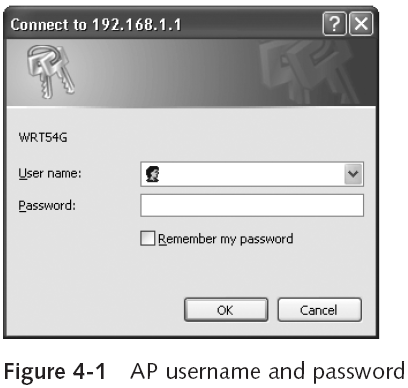
- Weak passwords
- Password paradox
- Passwords should never be written down, but instead must be committed to memory
- Passwords must be of a sufficient length and complexity
- Difficult to memorize these types of passwords
- Most users today have an average of 20 passwords
- Impossible to remember all of them
- Password paradox
- Weak passwords
- Characteristics of weak passwords
- A common word used as a password
- Not changing passwords unless forced to do so
- Passwords that are short
- Personal information in a password
- Using the same password for all accounts
- Writing the password down
- Password guessing attacks
- Brute force
- Dictionary
- Characteristics of weak passwords
- Weak passwords
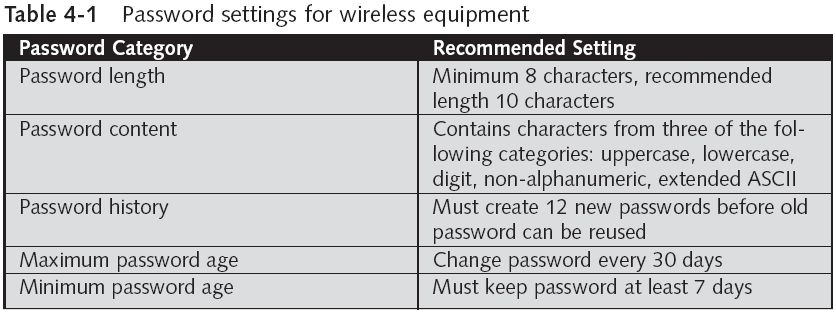
- Minimum criteria for creating good passwords
- Password must be at least eight characters long
- Password contains characters from at least three of the following five categories:
- English uppercase characters (A–Z)
- English lowercase characters (a–z)
- Base 10 digits (0–9)
- Non-alphanumeric (For example: !, $, #, or %)
- Extended ASCII characters
- Password does not contain three or more characters from the user’s account name
- Minimum criteria for creating good passwords
- Weak passwords
- Additional settings
- Enforce password history
- Maximum password age
- Minimum password age
- Minimum password length
- Additional settings
- SNMP community strings
- An SNMP-managed network consists of three key components:
- Managed device
- Agent - software which runs on managed devices
- Network management station (NMS) - software which runs on the manager
- A managed device is a network node that implements an SNMP interface that allows unidirectional (read-only) or bidirectional (read and write) access to node-specific information.
- SNMP agents are protected with a password known as a community string
- Types of community strings
- Read-only string allows information from the agent to be viewed
- Read-write string allows settings to be changed
- The most common default community strings are "public" for read-only access and "private" for read-write access. Using these default strings without changes poses a security risk
- Community strings in SNMP versions 1 and 2 are sent in clear text, making them vulnerable to interception by unauthorized users. For enhanced security, SNMP version 3 offers encrypted communications.
- Improper configuration
- Can often result in easy access to a system
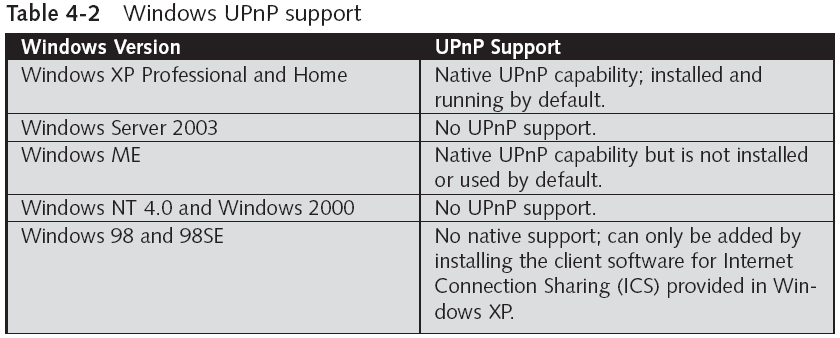
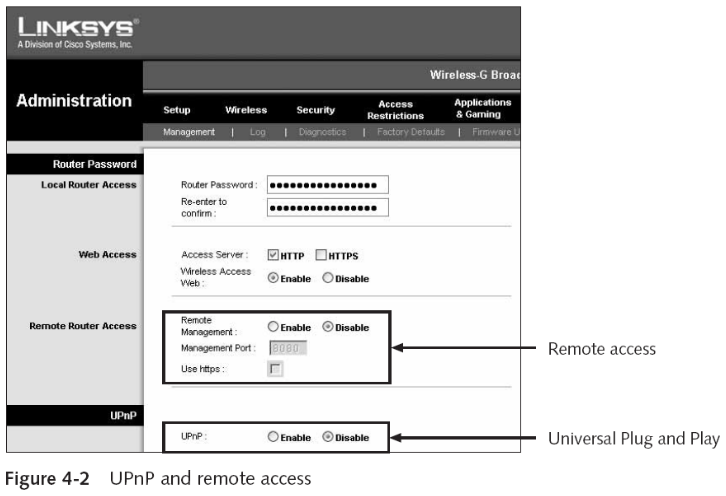
- Universal Plug and Play (UPnP)
- Allows devices on a network to discover other devices and determine how to work with them
- Vulnerabilities
- Can enable an attacker to gain complete control over an affected device
- Can enable an attacker to prevent an affected system from performing its intended service
- Improper configuration
- Remote access
- Allows for the wireless gateway to be configured remotely over the Internet
- Allows an attacker to attempt to break into the wireless gateway or access point
- Wireless gateway will permit an unlimited number of attempts to break the password
- Remote access

Vulnerabilities Associated with Using Public WLANsslides 20–27
- Malware
- Computer programs designed to break into and create havoc on portable or desktop computers
- Most common types of malware are viruses, worms, and logic bombs
- Virus
- Program that secretly attaches itself to another document or program
- Executes when that document or program is opened
- One new virus is written and released every hour
- Program that secretly attaches itself to another document or program
- Virus
- Actions performed by viruses
- Cause a computer to repeatedly crash
- Erase files from a hard drive
- Install hidden programs, such as stolen (“pirated”) software, which is then secretly distributed or even sold from the computer
- Make multiple copies of itself and consume all of the free space in a hard drive
- Reduce security settings and allow intruders to remotely access the computer
- Reformat the hard disk drive
- Actions performed by viruses
- Virus
- Symptoms
- A program suddenly disappears from the computer
- New icons appear on the screen
- New programs do not install properly
- Out-of-memory error messages appear
- Programs stop responding
- The computer sometimes starts normally, but at other times it stops responding before it finishes loading
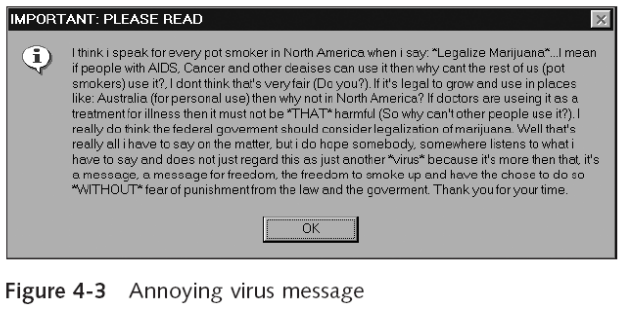
- Unusual dialog boxes or message boxes appear
- Sounds or music play from the speakers unexpectedly
- Symptoms
- Virus
- Symptoms
- Computer runs very slowly and takes a long time to start
- There is a significant amount of modem activity
- The computer restarts unexpectedly
- Error messages appear listing “critical system files” that are missing, and the operating system refuses to load
- Symptoms
- Worms
- Can travel by themselves
- Do not always require action by the computer user to begin their execution
- Logic bomb
- Lies dormant until triggered by a specific logical event
- Once triggered, the program can perform various malicious activities
- Extremely difficult to detect before they are triggered
- Often embedded in large computer programs
- Spyware
- Software that violates a user’s personal security
- Impairs control over the use of system resources
- Spyware
- Functions performed
- Advertising
- Collecting personal information
- Changing computer configurations
- Tool attackers employ spyware to gather personal information about users
- Functions performed
- Spyware
- Adware delivers advertising content
- In a manner or context that is unexpected and unwanted by the user
- Adware can also be a security risk
- Adware programs perform a tracking function
- Adware delivers advertising content
Vulnerabilities Associated with Implemented Unsecured WLANsslide 28
- Information theft
- Attacker can gain access to any folder set with file sharing enabled
- This would include sensitive documents on a file server
- Attacker can gain access to any folder set with file sharing enabled
- Repository for illegal content
- Attacker can set up storage space on a file server
- Or a home computer
- Attacker can also set up a Web site
- Attacker can set up storage space on a file server
- Spam site
- Spam: unsolicited e-mail
Wireless Infrastructure Attacksslide 29
- Attacks include:
- Direct attacks
- Denial-of-service attacks
Direct Attacks Through Rogue Access Pointsslides 30–31
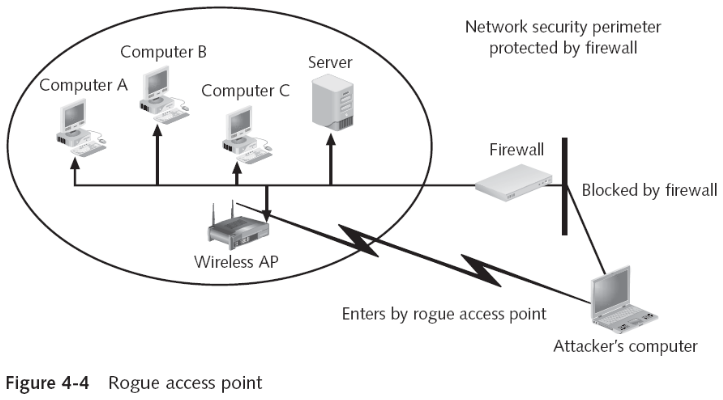
- Rogue access point
- AP installed by an employee
- Without the approval or supervision of the IT staff
- Can provide open access to an attacker
- Circumventing the security protections of the company’s network
- A rogue access point is behind the firewall
- AP installed by an employee
- Peer-to-peer attack
- Attacker’s wireless device attacks a similar device
Denial-of-Service Attack (DoS)slides 32–40
- Designed to prevent a device from performing its intended function
- DoS attacks are common against wired network servers
- SYN flood attack
- Client sends server a request called a SYN
- Server responds to the client with an ACK
- And waits for a reply
- Attacker never replies
- Server runs out of resources and can no longer function
- Wireless DoS attacks
- Deny wireless devices access to the access point
- Categories
- Physical layer attacks
- MAC layer attacks
- Physical layer attacks
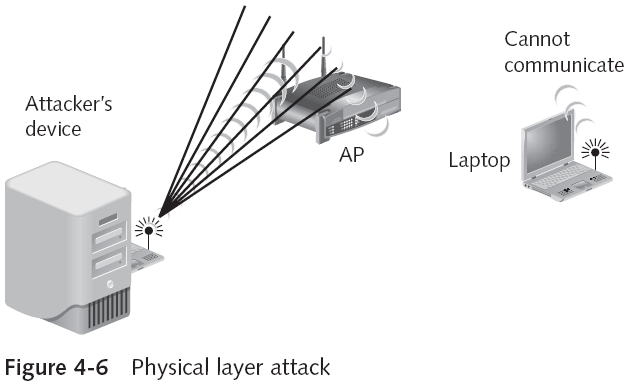
- Flood the spectrum with radiomagnetic interference
- To prevent a device from communicating with the AP
- Flood the spectrum with radiomagnetic interference
- Physical layer attacks
- Generally rare because sophisticated and expensive equipment is necessary
- It is possible to identify the location of the transmitter
- Other devices that use the ISM band
- Cordless telephones
- Microwave ovens
- Baby monitors
- Bluetooth personal area network devices
- MAC layer attacks
- Wireless medium shared among all devices
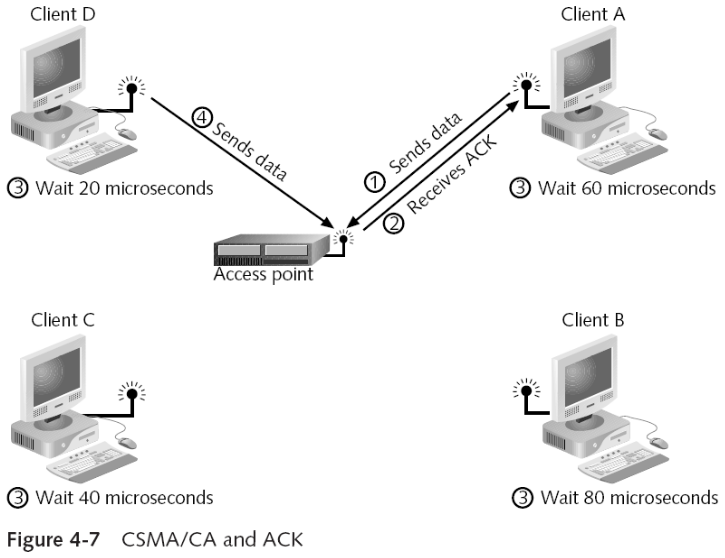
- Carrier Sense Multiple Access with Collision Avoidance (CSMA/CA)
- Attempts to prevent multiple wireless devices from transmitting at the same time
- Uses slot times and explicit frame acknowledgement
- Slot time
- Time that a device must wait after the medium is clear
- Frame acknowledgement
- ACK frame is sent back to sending device
- MAC layer attacks
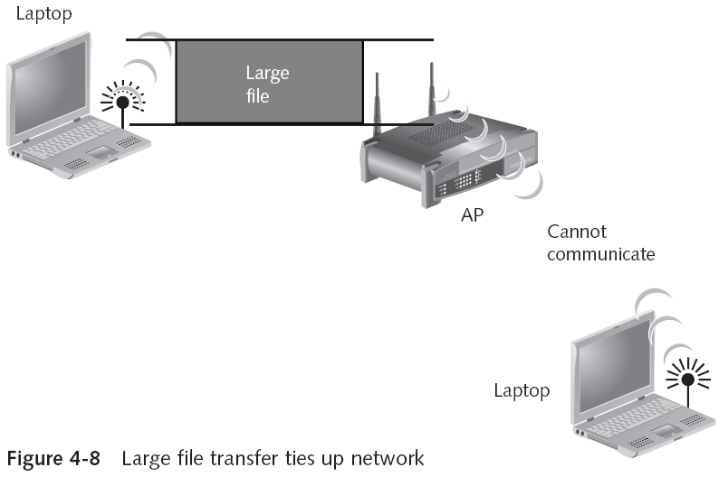
- Attacker who has already become associated with the WLAN can download an extremely large file
- This will effectively “tie up” the network
- Packet generator
- Creates fake packets and floods the wireless network
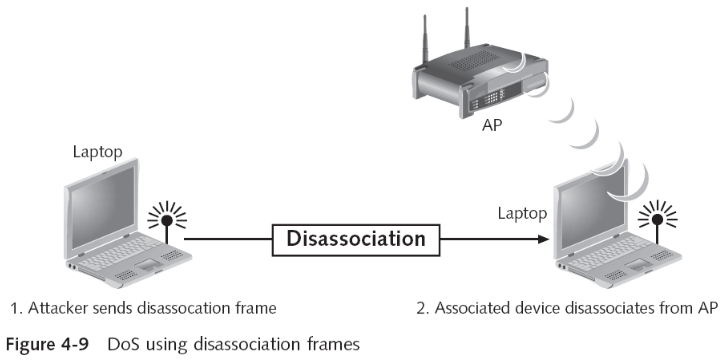
- Attacker sends disassociation frames to wireless devices
- Device will disassociate from the access point
- Attacker who has already become associated with the WLAN can download an extremely large file
Quick review questions
- Explain the basic vulnerabilities of a WLAN
- Explain how malware and spyware can infect wireless networks
- List the vulnerabilities involved with implementing unsecured wireless LANs
- Explain the different types of wireless infrastructure attacks
Summary of main teaching points
- Security vulnerabilities for wireless LANs categories
- Basic vulnerabilities
- Vulnerabilities associated with using public WLANs
- Vulnerabilities associated with implementing unsecured WLANS
- Basic vulnerabilities include:
- Default passwords, weak passwords, SNMP community strings, and improper configuration
- Vulnerabilities when using a public-access WLAN include malware and spyware
- Vulnerabilities associated with implementing an unsecured WLAN
- Information theft
- Storing illegal content
- Spam
- Direct attacks on the wireless infrastructure can be implemented through rogue access points
- Wireless DoS attacks can be physical layer attacks or MAC layer attacks