CT094-3-3-WMSS · Chapter 08
Wireless Security Models
Learning outcomes
- Explain the advantages of WPA and WPA2
- Explain the technologies that are part of the personal security model
- List the features of the transitional security model
- Define the enterprise security model
Topic structure
- Wireless Security Solutions
- Transitional Security Model
- Authentication
- Personal Security Model
- Enterprise Security Model
- Robust Secure Network (RSN)
Key terms
IEEE 802.11iWEPWPA/WPA2AESRSN
Wireless Security Solutionsslide 5
- WEP suffers from serious weakness
- “Band-aid” solutions
- WEP2 and Dynamic WEP
- Better solutions
- IEEE 802.11i (WPA, WPA2)
- Wi-Fi Protected Access (WPA)
- Wi-Fi Protected Access 2 (WPA2)
IEEE 802.11islides 6–10
- IEEE 802.11i addresses the two weaknesses of wireless networks: encryption and authentication
- Encryption
- Replaces the RC4 stream cipher algorithm with a block cipher
- Manipulates an entire block of text at one time
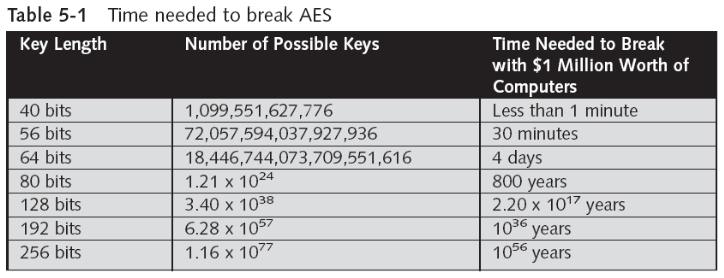
- 802.11i uses the Advanced Encryption Standard (AES)
- Designed to be an encryption technique that is secure from attacks
- Replaces the RC4 stream cipher algorithm with a block cipher
- Authentication and key management
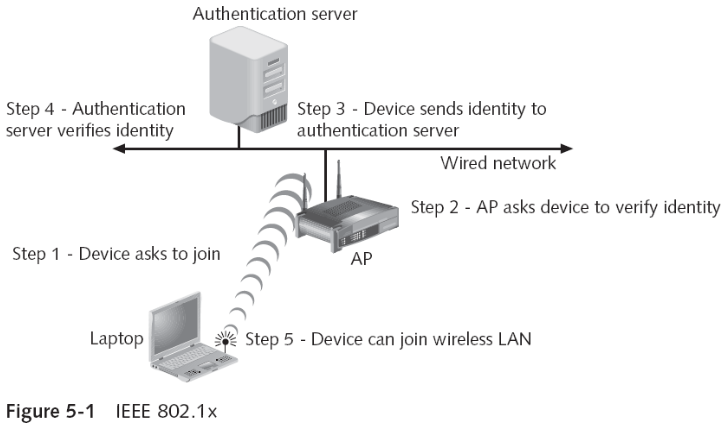
- Accomplished by the IEEE 802.1x standard
- Implements port security
- Blocks all traffic on a port-by-port basis
- Until the client is authenticated using credentials stored on an authentication server
- Accomplished by the IEEE 802.1x standard
- Key-caching
- Stores information from a device on the network
- If a user roams away and later returns
- She/he does not need to re-enter all of the credentials
- Pre-authentication
- Allows a device to become authenticated to an AP
- Before moving into range of the AP
- Device sends a pre-authentication packet to the AP the user is currently associated with
- And the packet is then routed to a remote AP or APs
- Allows for faster roaming between access points
- Allows a device to become authenticated to an AP
Wi-Fi Protected Access (WPA)slides 11–14
- Subset of 802.11i and addresses both encryption and authentication
- Temporal Key Integrity Protocol (TKIP)
- TKIP keys are known as per-packet keys
- TKIP dynamically generates a new key for each packet that is created
- Prevent collisions
- Which was one of the primary weaknesses of WEP
- Authentication server can use 802.1x to produce a unique master key for that user session
- TKIP distributes the key to wireless devices and AP
- Setting up an automated key hierarchy and management system
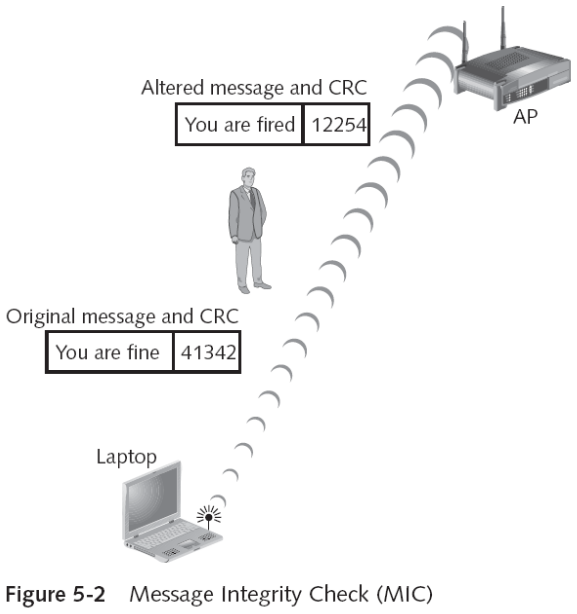
- WPA replaces the Cyclic Redundancy Check (CRC) with the Message Integrity Check (MIC)
- Designed to prevent an attacker from capturing, altering, and resending data packets
- Provides a strong mathematical function
- Clients are de-authenticated and new associations are prevented for one minute if an MIC error occurs
- WPA authentication
- Accomplished by using either IEEE 802.1x or preshared key (PSK) technology
- PSK authentication uses a passphrase to generate the encryption key
- Passphrase must be entered on each access point and wireless device in advance
- Serves as the seed for mathematically generating the encryption keys
- WPA was designed to address WEP vulnerabilities with minimum inconvenience
Wi-Fi Protected Access 2 (WPA2)slides 15–18
- Second generation of WPA security
- Based on the final IEEE 802.11i standard
- Uses the Advanced Encryption Standard (AES) for data encryption
- Supports IEEE 802.1x authentication or PSK technology
- WPA2 allows both AES and TKIP clients to operate in the same WLAN
- This allows devices that only support TKIP (older devices) to connect using WPA, while newer devices connect using AES and WPA2.
- Both types of clients share the same SSID (network name) but operate with their respective encryption protocols

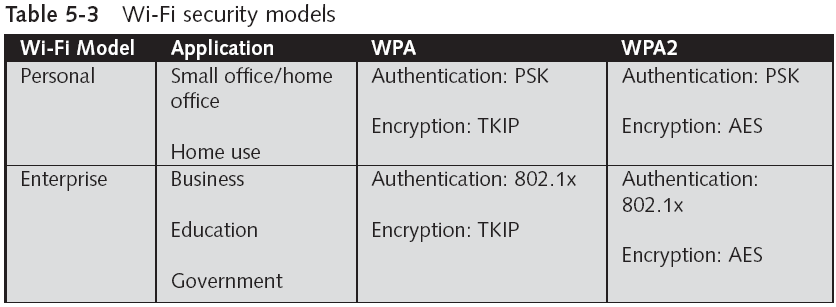
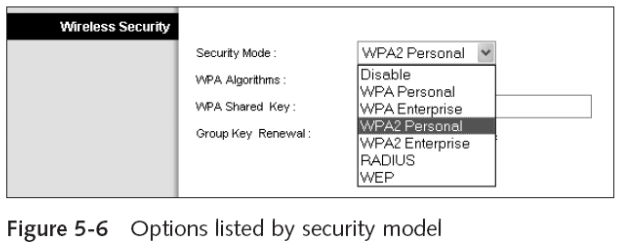
- Wi-Fi Alliance wireless security models based on WPA and WPA2
- WPA—Personal Security
- WPA—Enterprise Security
- WPA2—Personal Security
- WPA2—Enterprise Security
- Transitional security model
- Used as a “bridge” solution in situations where WPA or WPA2 security is not available
- Intended as a temporary fix
Transitional Security Modelslide 19
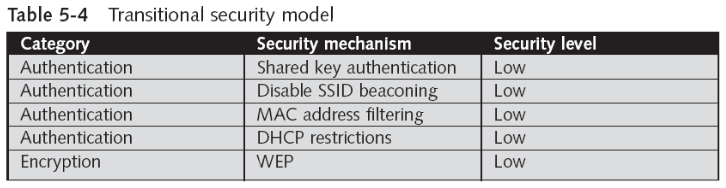
- Should only be implemented as a temporary solution
Authenticationslides 20–23
- Shared key authentication
- Should be used instead of open system authentication
- Uses WEP keys for authentication
- Based on a challenge-response scheme
- SSID beaconing
- Should be turned off
- May prevent a “casual” unauthorized user or novice attacker from capturing the SSID and entering the network
- Use a hard-to-guess SSID in a WLAN
- MAC address filtering limitations
- Managing a large number of MAC addresses is difficult
- Does not provide an easy means to temporarily allow a guest user to access the network
- WLANs initially exchange MAC addresses in cleartext
- A MAC address can be “spoofed” or substituted
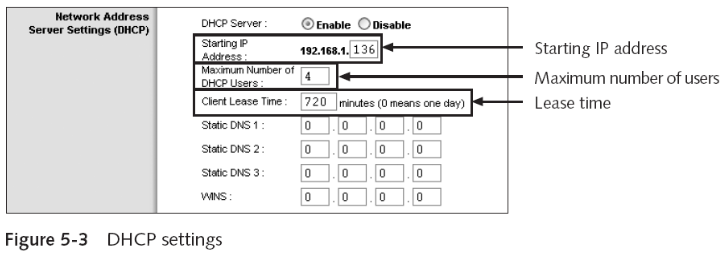
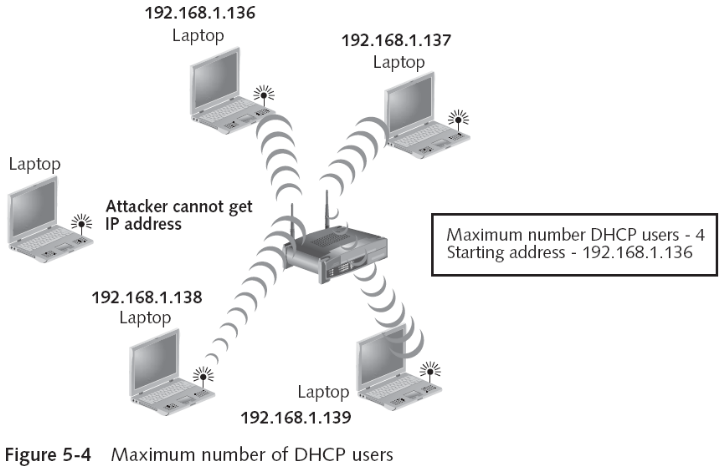
- DHCP restrictions
- DHCP “leases” IP addresses to clients to use while they are connected to the network
WEP Encryptionslides 24–25
- Should be turned on
- If no other options are available for encryption
- The longest WEP key available should be used for added security
- Most vendors have the option of a 128-bit WEP key
- There is evidence that WEP passphrase generators may create predictable keys
Personal Security Modelslide 26
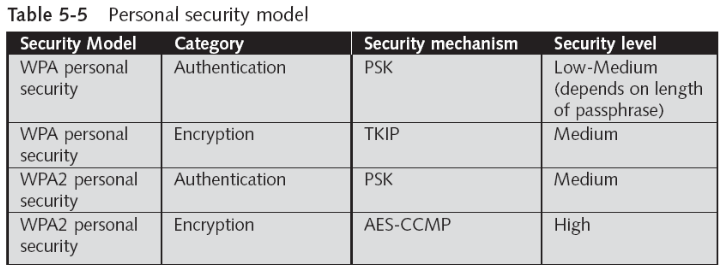
- Designed for single users or small office/home office (SOHO) settings
- Generally, 10 or fewer wireless devices
- Intended for settings in which an authentication server is unavailable
- Divided into two parts, WPA and WPA2
- WPA2 should always be used instead of WPA
WPA Personal Securityslides 27–29
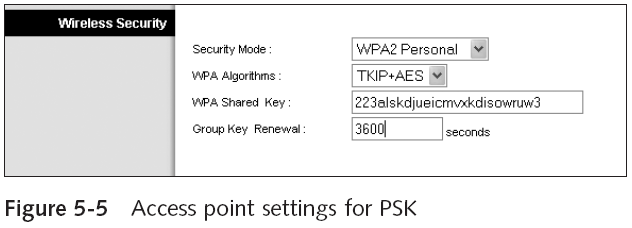
- PSK authentication
- Purchasing, installing, and managing an authentication server is costly
- May require special technical skills
- PSK functions
- Used to authenticate the user
- Plays a role in encryption
- PSK vulnerabilities
- Key management
- Passphrases
- Purchasing, installing, and managing an authentication server is costly
WPA2 Personal Securityslides 30–32
- PSK authentication
- PSK keys are automatically changed (called rekeying)
- And authenticated between devices after a specified period
- Known as the rekey interval
- And authenticated between devices after a specified period
- PSK keys are automatically changed (called rekeying)
- AES-CCMP encryption
- CCMP stands for Counter Mode CBC-MAC Protocol (Counter Mode with Cipher Block Chaining Message Authentication Code Protocol)
- AES is used in WPA2 for data encryption
- AES-CCMP is the encryption protocol in the 802.11i standard
- CCMP is based upon the Counter Mode with CBC-MAC (CCM)
- AES-CCMP encryption
- CCM provides data privacy
- CBC-MAC provides data integrity and authentication
- AES algorithm processes blocks of 128 bits
- Length of the cipher keys and number of rounds can vary
- It is recommended that AES encryption and decryption be performed in hardware
Enterprise Security Modelslide 33
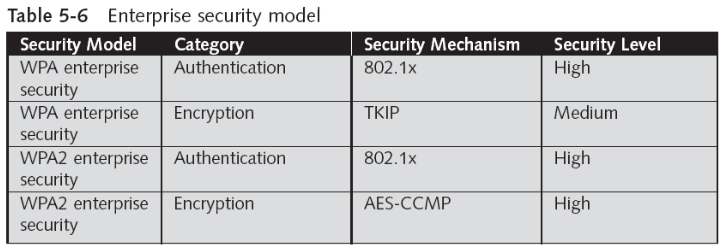
- Most robust level of security
- Designed for medium to large-sized organizations
- Intended for settings in which an authentication server is available
- Divided into two parts, WPA and WPA2
WPA Enterprise Securityslides 34–37
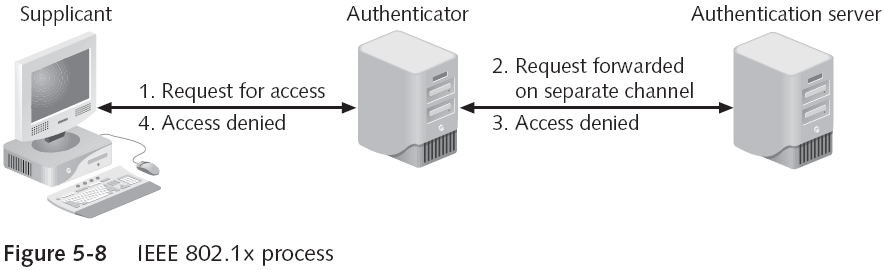
- IEEE 802.1x authentication
- Provides an authentication framework for all IEEE 802-based LANs
- Elements
- Supplicant
- Authenticator
- Authentication server
- IEEE 802.1x supplicant
- Software that implements the IEEE 802.1x framework
- May be included in the client operating system or WNIC
- IEEE 802.1x authentication
- Authentication server
- Stores the list of the names and credentials of authorized users to verify their authenticity
- Typically a Remote Authentication Dial-In User Service (RADIUS) server is used
- Allows a company to maintain user profiles in a central database that all remote servers can share
- Other options
- Structured Query Language (SQL)
- Lightweight Directory Access Protocol (LDAP)
- Microsoft Active Directory
- Authentication server
- TKIP encryption
- Should be considered an interim WPA enterprise security solution
- A more robust encryption protocol is AES-CCMP
WPA2 Enterprise Securityslides 38–40
- IEEE 802.1x authentication
- Disadvantage
- High cost involved with purchasing, installing, and maintaining an authentication server
- Disadvantage
- AES-CCMP encryption
- A 128-bit key length is used
- AES encryption includes four stages that make up one round
- Each round is iterated 10 times
- Robust Secure Network (RSN)
- is a term used to describe a set of security features and protocols implemented in Wi-Fi networks to ensure robust protection against various security threats. RSN builds upon the security enhancements introduced in the IEEE 802.11i standard, which is commonly known as WPA2 (Wi-Fi Protected Access 2).
- Uses dynamic negotiation of authentication and encryption algorithms
- Between access points and wireless devices
- RSNs evolve as vulnerabilities are exposed OR improved security is introduced
- Uses dynamic negotiation of authentication and encryption algorithms
Quick review questions
- List down the advantages of WPA and WPA2
- Explain the technologies that are part of the personal security model
- Explain the features of the transitional security model
- Explain the enterprise security model
Summary of main teaching points
- Additional security solutions
- IEEE 802.11i
- Wi-Fi Protected Access (WPA)
- Wi-Fi Protected Access Version 2 (WPA2)
- IEEE 802.11i standard provided a more solid wireless security model
- Uses AES and IEEE 802.1x port security
- WPA is a subset of 802.11i and addresses both encryption and authentication
- Uses Temporal Key Integrity Protocol (TKIP) and a Message Integrity Check (MIC)
- The transitional security model should be implemented only as a temporary solution
- The personal security model is designed for single users or small office home office (SOHO)
- The enterprise security model is designed for medium to large-sized organizations