CT094-3-3-WMSS · Chapter 09
Enterprise Wireless Hardware Security
Learning outcomes
- List and describe the functions of the different types of wireless LAN hardware used in an enterprise
- Tell how access control and protocol filtering can protect a WLAN
- Describe the functions of Quality of Service, handoffs, and power features of wireless networking hardware
Topic structure
- Enterprise WLAN Hardware
- Hardware Security Features
- Other Hardware Features
Key terms
Access pointsRemote wireless bridgesWireless routersWireless gatewaysWireless switchesWireless mesh routersQuality of serviceFast handoffPower features
Enterprise WLAN Hardwareslide 5
- Wireless hardware
- Access points
- Remote wireless bridges
- Wireless routers
- Wireless gateways
- Wireless switches
- Wireless mesh routers
Access Pointslides 6–7
- AP parts
- An antenna and a radio transmitter/receiver to send and receive signals
- An RJ-45 wired network interface that allows it to connect by cable to a standard wired network
- Special bridging software to interface wireless devices to other devices
- Basic functions
- Acts as the base station for the wireless network
- Acts as a bridge between wireless and wired network
- Range of an access point depends on:
- Type of wireless network that is supported
- Walls, doors, and other solid objects can reduce the distance the signal may travel
- Number of wireless clients supported varies
- Theoretical: 100 clients
- For light traffic: 50 clients
- For heavy traffic: 20 clients
Remote Wireless Bridgeslides 8–17
- Bridge
- Connects two network segments together
- Segments can use different types of physical media
- Software for transmitting and receiving signals
- Remote wireless bridge
- Wireless device designed to connect two or more wired or wireless networks
- Transmits at higher power than APs
- Uses a highly directional or semi-directional antenna
- Highly directional antennas
- Usually concave, dish-shaped devices used for long distance, point-to-point wireless links
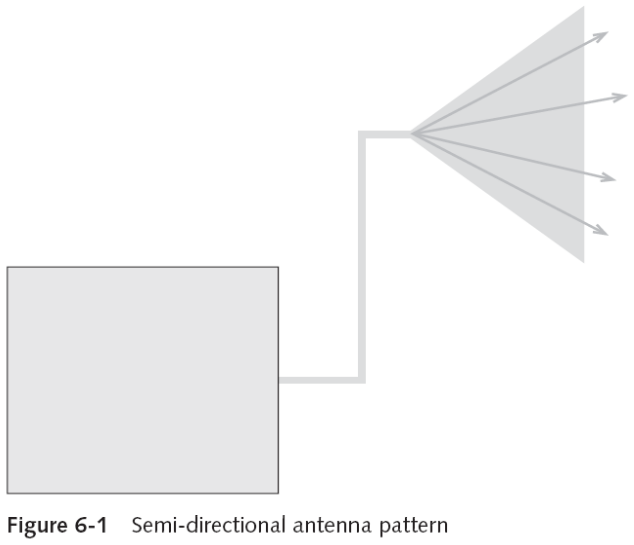
- Semi-directional antenna
- Focuses the energy in one direction
- Does not have the high-power level of a highly directional antenna
- Primarily used for short- and medium-range remote wireless bridge networks
- Delay spread
- Minimizes the spread of the signal so that it can reach farther distances
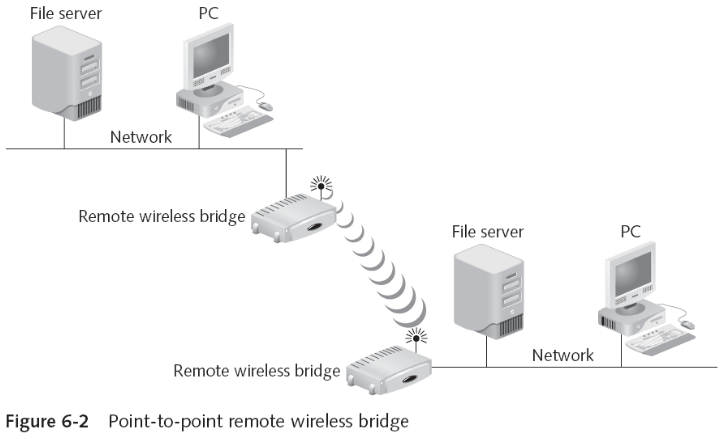
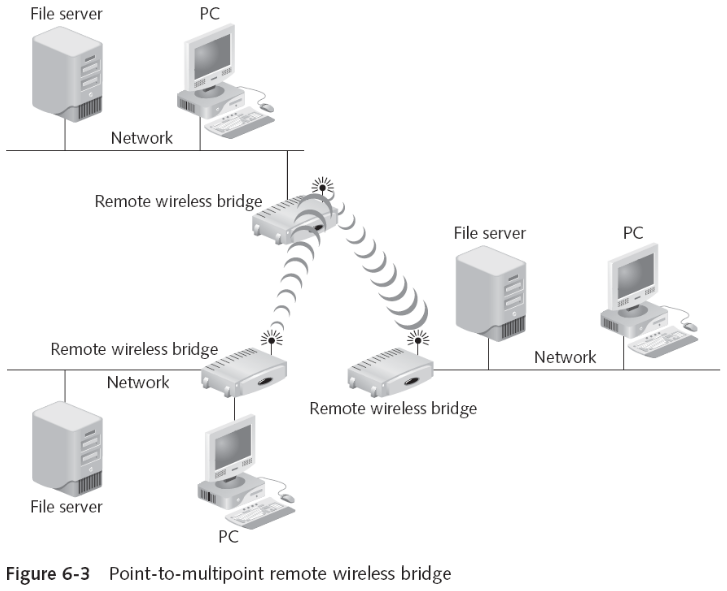
- Remote wireless bridges support two types of connections
- Point-to-point connections
- Point-to-multipoint connections
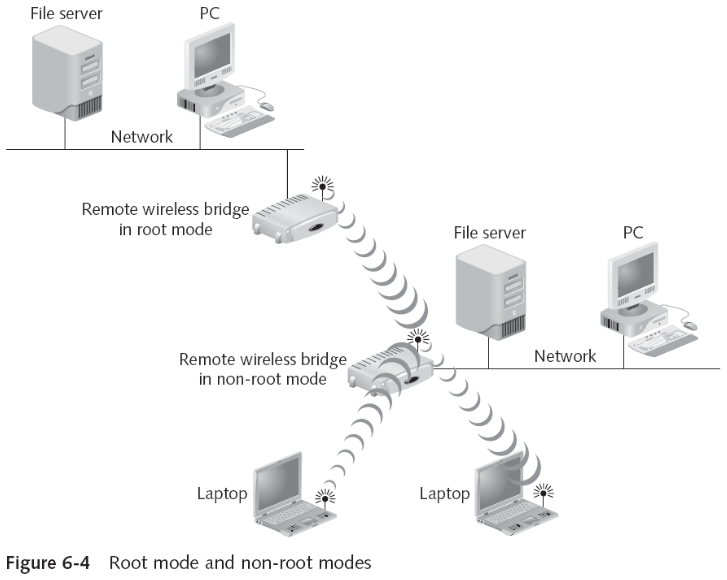
- Remote wireless bridge modes
- Access point mode
- Standard AP
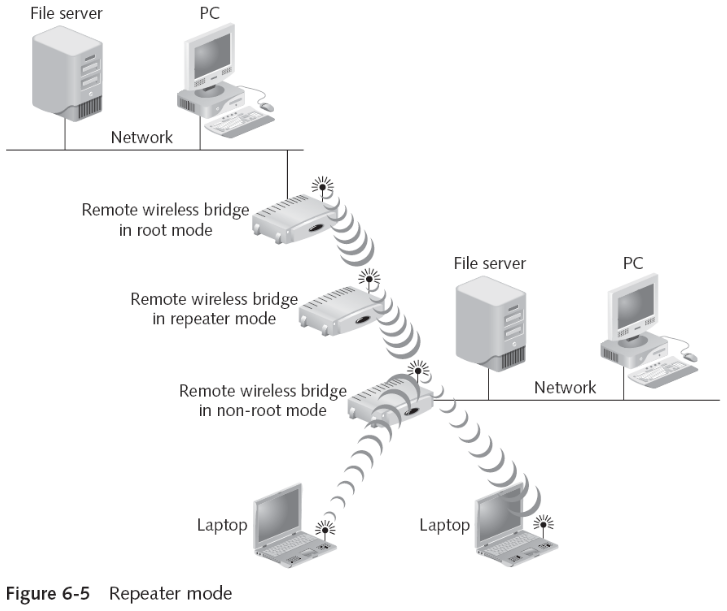
- Root mode
- Acts as a root bridge and can communicate only with other non-root bridges
- Non-root mode
- Can transmit only to a root bridge
- Repeater mode
- Extends the distance between LAN segments
- Access point mode
- Remote wireless bridges
- Cost-effective alternative to expensive leased wired options for connecting remote buildings
- Distance can be up to 29 kilometers (18 miles) transmitting at 11 Mbps
- Or up to 40 kilometers (25 miles) transmitting at 2 Mbps
Wireless Routerslides 18–20
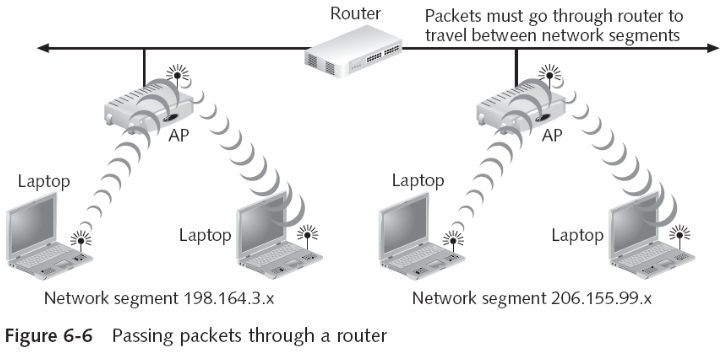
- Router
- Transfers packets between networks
- Selects the best link (route) to send packets
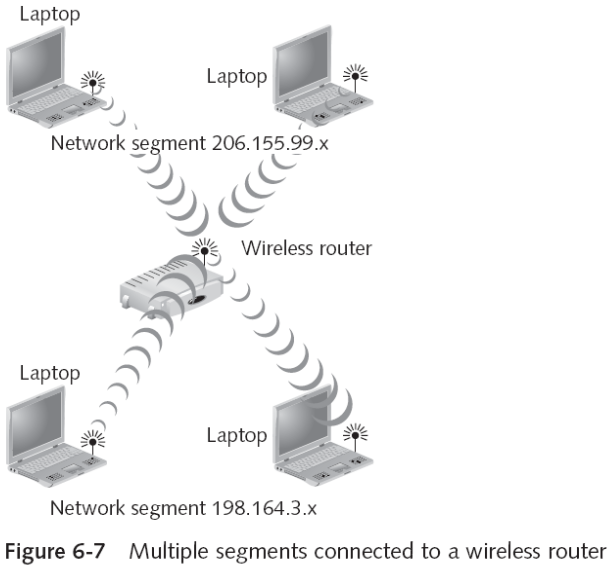
- Wireless router
- Combines an access point with a router
- Typically, with multiple ports
- Advantages
- Connects multiple networks
- Improves network performance
- Shares single IP address
Wireless Gatewayslide 21
- Gateway
- Acts as an entrance to another network
- Wireless gateway
- Combines an access point, router, network address translation, and other networking features
- Enterprise wireless gateway functions
- Authentication
- Encryption
- Intrusion detection and malicious program protection
- Bandwidth management
- Centralized network management
Wireless Switchslides 22–26
- Switch
- Joins multiple computers within one LAN
- Contains more “intelligence” than a hub
- Types of switches
- Unmanaged switch
- Provides no management capabilities of the switch
- Managed switch
- Provides all of the features of an unmanaged switch along with enhanced management features
- Supports both control and monitoring of the network
- Unmanaged switch
- One of the challenges of a wireless LAN in an enterprise setting
- Integrates management of wired and wireless networks
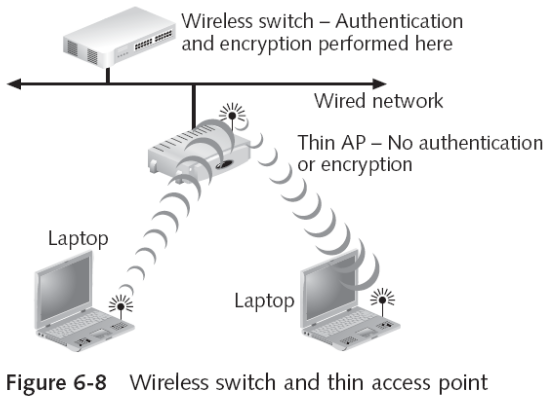
- Wireless switch
- Often a rack-mounted unit
- Performs user authentication and encryption
- Thin access point
- Simplified radios with a media converter for the wired network
- Advantages
- Simplified wireless network management
- Eliminates handoff procedures
- Disadvantages
- All thin APs and wireless switches are proprietary
- Thin APs do not provide true convergence of the wired and wireless networks
- IEEE 802.1v protocol (Supports Wireless switches)
- Assists the management of WLAN devices
- - A Thin Wireless Access Point is basically a radio and antenna that is controlled by a wireless switch. If end-user deploys Thin Wireless Access Points, the entire configuration takes place at the switch. This usually saves the time and money.
- IEEE 802.1v protocol features
- Load balancing
- Automatic configuration
Wireless Mesh Routersslides 27–34
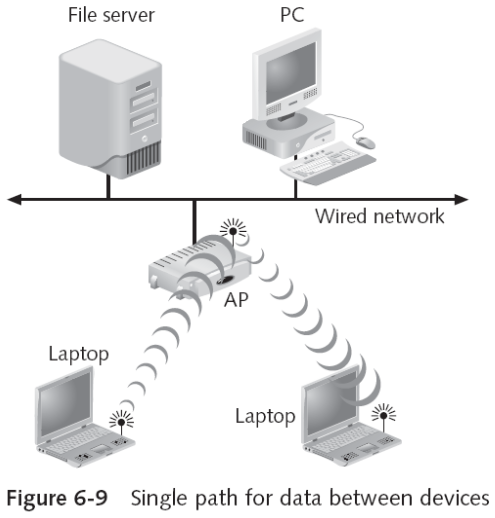
- Limitations of connecting APs to a router via the wired network
- Placement of APs is limited
- APs have a limited range
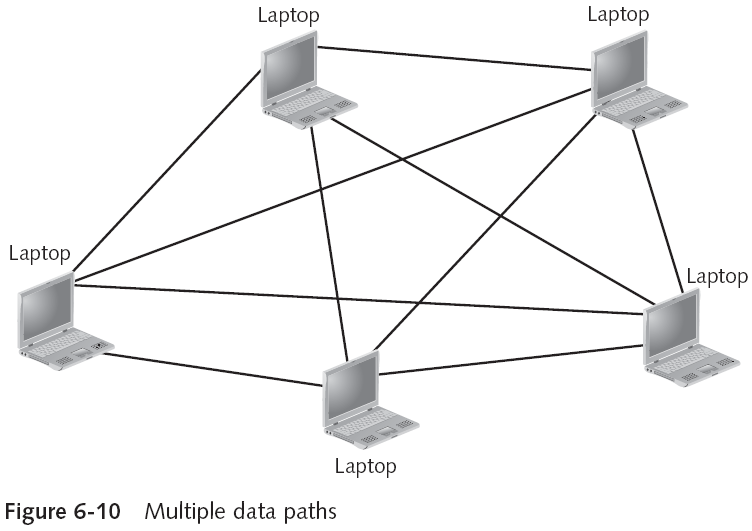
- Mesh networks
- Solve these limitations
- Provide multiple paths through which data can travel
- Best example: the Internet
- Wireless mesh network
- Allows for multiple paths for wireless transmissions
- Wireless mesh network types
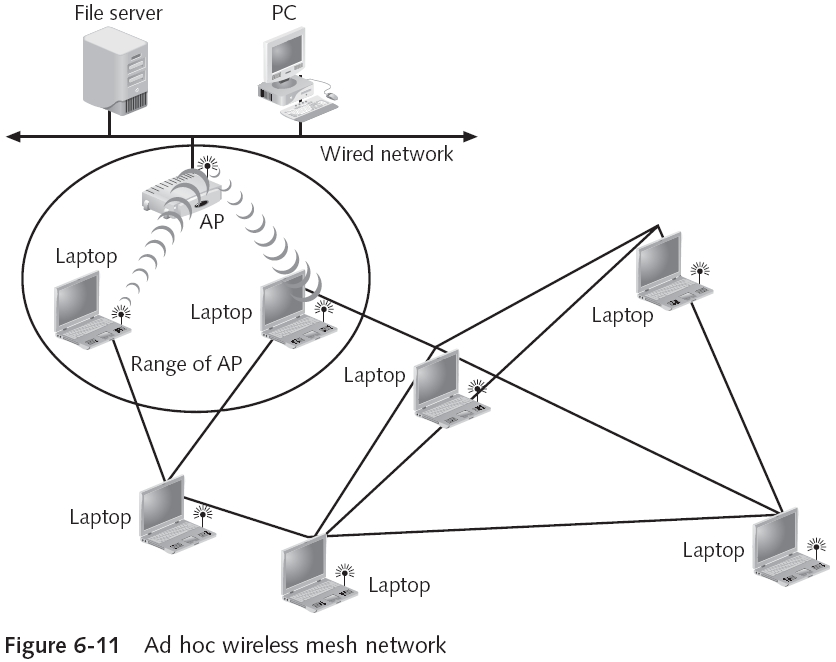
- Ad hoc wireless mesh network
- Allows greater distances away from the access point
- Each client device can act as a relay station for signals
- Advantages
- Decentralized network
- Can decrease costs
- Can also be reliable
- Ad hoc wireless mesh network
- Wireless mesh network types
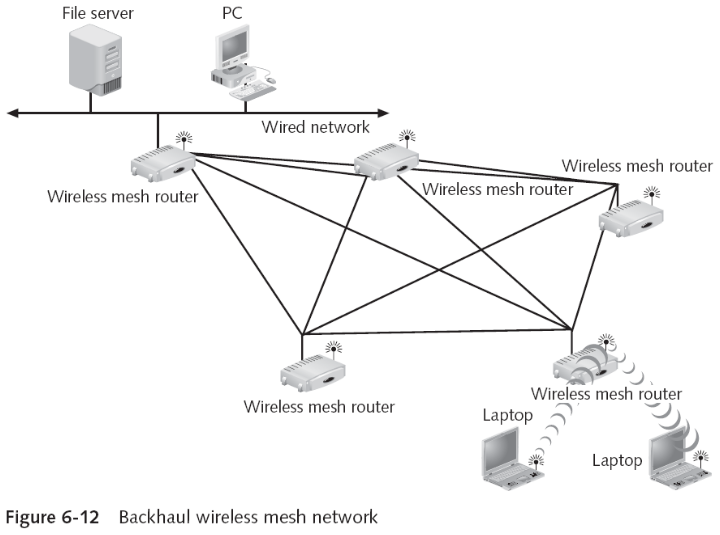
- Backhaul wireless mesh network
- Connects special access points, known as wireless mesh routers
- In a mesh configuration
- Provides alternative data paths for the “backside” connection to the Internet
- Backhaul
- Connection from the routers to the Internet
- Used extensively in outdoor WLANs
- Can be quickly deployed in an emergency
- Connects special access points, known as wireless mesh routers
- Backhaul wireless mesh network
- No standards exist for wireless mesh networks
- IEEE 802.11s task group is working on standards
- Over 70 different wireless mesh routing protocols
- Differ in the following features:
- Algorithm
- Management data versus transmit data
- Number of radios
- Differ in the following features:
Hardware Security Featuresslide 35
- Features include:
- Controlling access to hardware
- Protocol filtering
Controlling Access to Hardwareslides 36–38
- Access control
- Restricts the user to accessing only the resources essential for the user to do his or her job
- Limits access to resources based on the users’ identities and their membership in various groups
- Mandatory access control (MAC)
- Most restrictive model
- User is not allowed to give access to another user to use or access anything on the network
- All controls are fixed in place and there is no flexibility
- Typically used in military environments
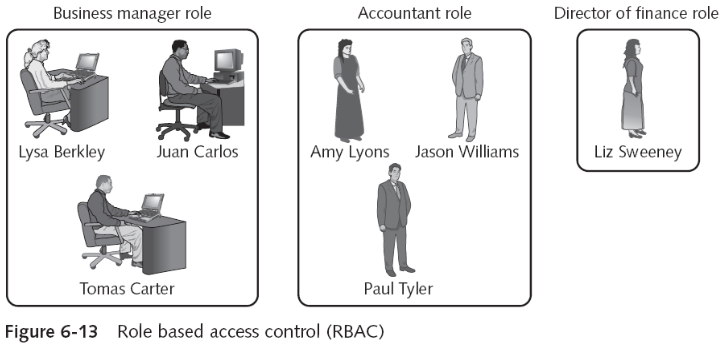
- Role based access control (RBAC)
- Administrator assigns permissions to a position (role)
- Assign users and other objects to that role
- Administrator assigns permissions to a position (role)
- Discretionary access control (DAC)
- Least restrictive model
- User can adjust the permissions for other users over network devices
- Poses risks in that incorrect permissions may be granted or given
Protocol Filteringslides 39–40
- Filtering restricts the traffic on a network based on specific criteria
- Types of filtering
- Address filtering
- Data filtering
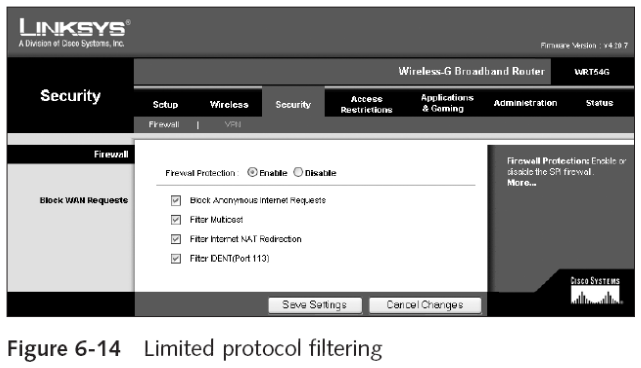
- Protocol filtering
- Some access points can be configured to filter unwanted protocols
- From either entering or leaving the wireless network
- Can only be used in a few specific situations
Other Hardware Featuresslide 41
- Features include:
- Quality of service
- Fast handoff
- Power features
Quality of Service (IEEE 802.11e)slides 42–43
- IEEE 802.11 standard was intended to be “fair”
- Not appropriate for real-time traffic
- Quality of Service (QoS)
- Capability to prioritize different types of frames
- IEEE 802.11e task group has two new modes of operation for the 802.11 MAC layer
- Enhanced Distributed Channel Access (EDCA)
- Hybrid Coordination Function Controlled Channel Access (HCCA)
- Enhanced Distributed Channel Access (EDCA)
- Contention-based
- Supports four different “streams” (types) of traffic
- Voice
- Video
- Best effort
- Background
- Provides relative QoS but cannot guarantee its service
Handoffsslide 44
- Inter-Access Point Protocol (IAPP) (IEEE 802.11F)
- 802.11 standard did not specify how communications were to take place between access points
- 802.11F specified information that access points need to exchange to support WLAN roaming
- Fast Handoff (IEEE 802.11r)
- VoWLAN mobile phones need fast handoff
- Allows a wireless client to determine the QoS (and security) being used at a different AP
- Before making the transition
Quick review questions
- Describe the functions of the different types of wireless LAN hardware used in an enterprise
- Explain how access control and protocol filtering can protect a WLAN
- Explain the functions of Quality of Service, handoffs, and power features of wireless networking hardware
Summary of main teaching points
- Wireless hardware
- Access points
- Remote wireless bridges
- Wireless routers
- Wireless gateways
- Wireless switches
- Wireless mesh routers
- Access control limits access to resources
- Based on the users’ identities and membership
- Some access points can be configured to filter unwanted protocols
- The capability to prioritize different types of frames is known as Quality of Service
- Inter-Access Point Protocol (used in IEEE 802.11F) sets standards for handoffs between access points
- Fast handoff is based on the IEEE 802.11r standard
- Power management types
- IEEE 802.11h standard
- Power over Ethernet (IEEE 802.3af)