CT094-3-3-WMSS · Chapter 10
Designing a Secure Wireless Network
Learning outcomes
- Describe the basic principles of security design
- Define network segmentation and tell how it can be used for WLANs
- List ways in which wireless hardware can be located securely
- Describe the steps that can be taken to protect wireless devices
Topic structure
- Basic Principles of Security Design
- Network Segmentation
- Wireless Device Security
- Rootkit Detectors
Key terms
LayeringLimitingDiversityObscuritySimplicitySegmentationVLAN
Basic Principles of Security Designslide 5
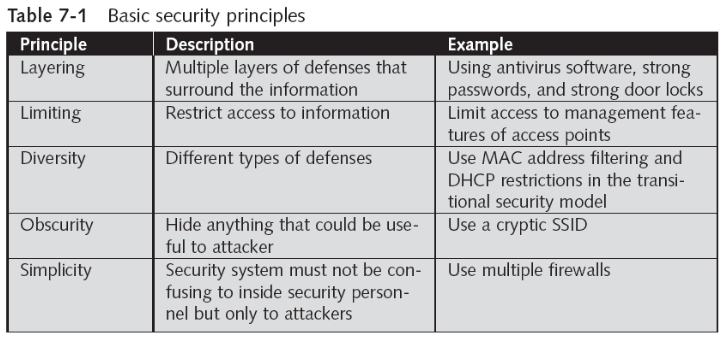
- Five key security principles
- Layering
- Limiting
- Diversity
- Obscurity
- Simplicity
Layeringslide 6
- Wireless security should be created in layers
- Making it unlikely that an attacker possesses the tools and skills to break through all the layers of defenses
- Layers include:
- Strong door locks
- Antivirus software
- Strong passwords
- Problem with layered approach
- All the layers must be properly coordinated to provide a cohesive security perimeter
Limitingslide 7
- Limiting access to information reduces the threat against it
- Only those who must use data should have access
- The amount of access granted to someone should be limited to what that person needs to know
- Limiting is more than placing a password on a system
- Users should have the least amount of information necessary to do their jobs, and no more
Diversityslide 8
- Closely related to layering
- Layers must be different (diverse)
- If a thief penetrates one layer, he cannot use the same techniques to break through all other layers
- Using diverse layers of defense means:
- Breaching one wireless security layer does not compromise the entire system
- Diversity in the transitional security model involves:
- Implementing both MAC address filtering and DHCP restrictions
Obscurityslide 9
- Security by obscurity
- Obscuring what goes on inside a system or organization and avoiding clear patterns of behavior
- Makes attacks from the outside much more difficult
- Wireless information security
- Important not to advertise what security is in place
- Do not use predictable passwords
- Security by obscurity is sometimes criticized as being too weak
Simplicityslides 10–11
- Information security is, by its very nature, complex
- Complex security systems
- Can be hard to understand, hard to troubleshoot, and hard to feel secure about
- Secure system should be simple enough for those on the inside to understand and use
- Challenge is to make the system simple from the inside but complex from the outside
- Will reap a large benefit in information security
Network Segmentationslides 12–16
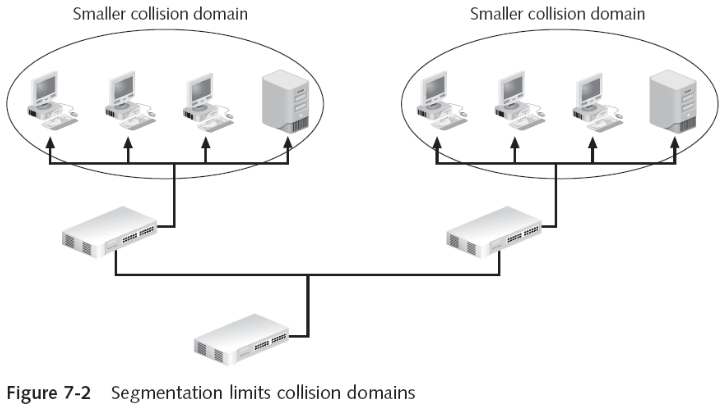
- Segmentation divides the network into smaller units
- Network segment is a subset of a larger network
- Reduces the amount of traffic on a network
- Non-deterministic networking
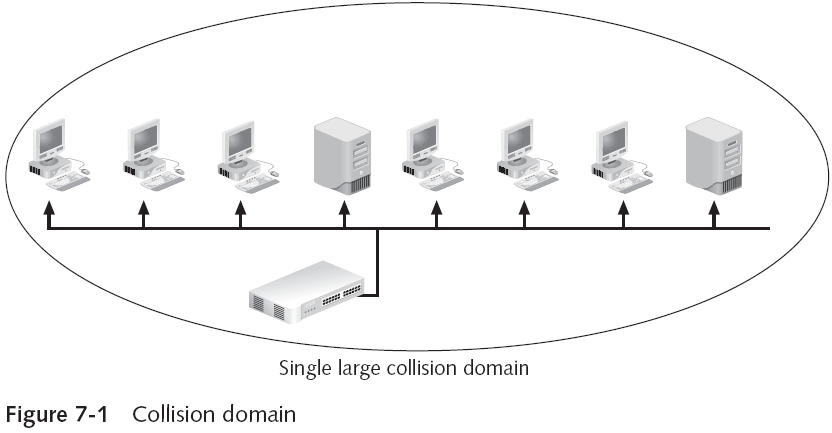
- Devices share same media and send packet any time
- Collision: two packets are sent at the same time
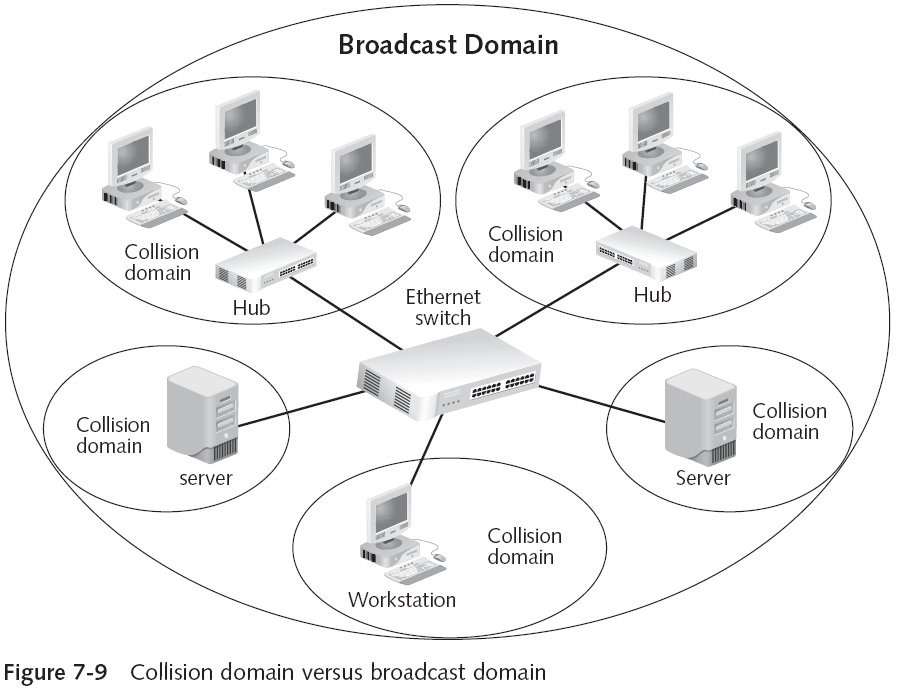
- Collision domain
- Area that encompasses all of the network devices that can cause collisions
- Network segment and a subnet are different
- Segment is created by connecting equipment to a physical device
- Subnets are usually created by grouping together computers by Internet protocol (IP) addresses
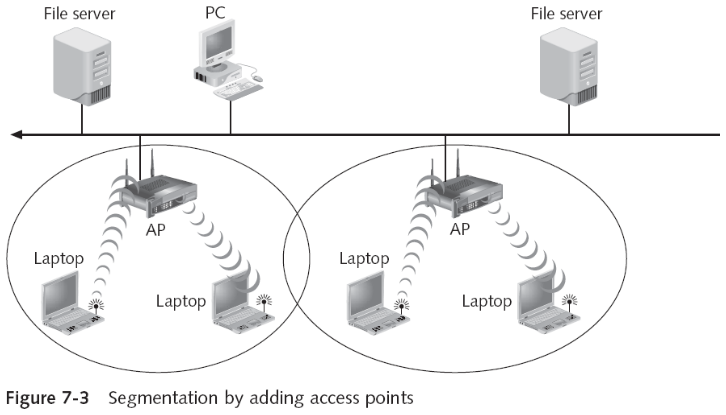
- Wireless segmentation can be accomplished through adding access points
- Devices serviced by separate APs are not strictly sharing the same media
- Segmentation creates smaller segments for security
Segmenting with Devices and Technologiesslides 17–30
- Segments can be created using bridges, switches, and routers
- In wireless network, segments are created using:
- Wireless gateways
- Wireless routers
- Wireless switches
- Firewalls
- Demilitarized zones
- Network address translation
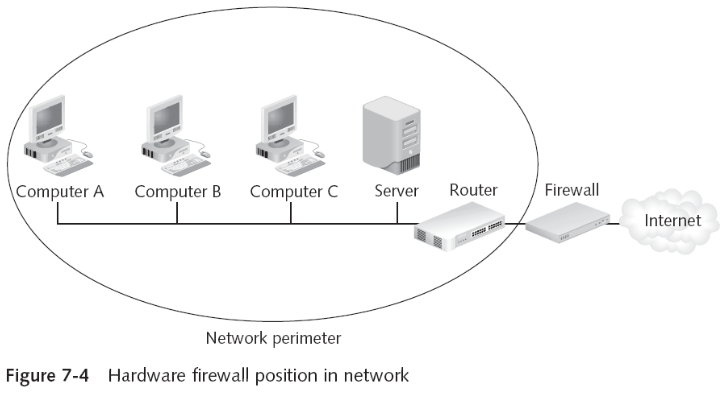
- Firewall
- Sometimes called a packet filter
- Designed to prevent malicious packets from entering the network or computer
- Can be software based or hardware based
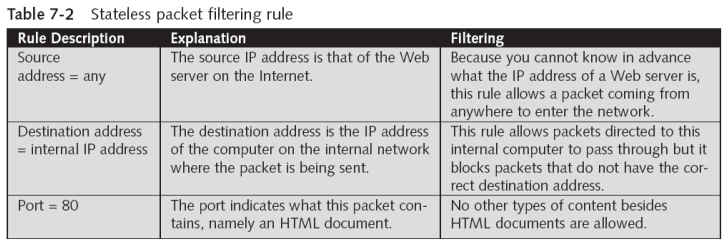
- The foundation of a firewall is a rule base
- Establishes what action the firewall should take when it receives a packet: allow, block, or prompt
- Stateless packet filtering
- Looks at the incoming packet and permits or denies it based strictly on the rule base
- Firewall
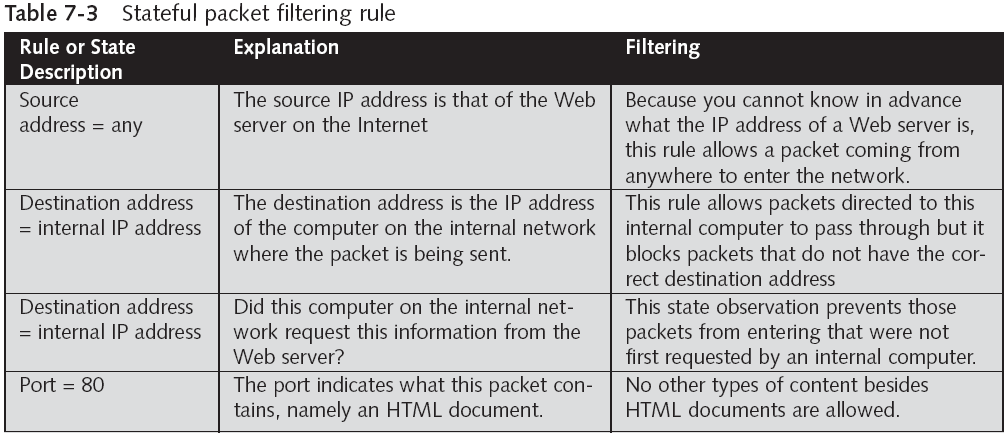
- Stateful packet filtering
- Keeps a record of the state of a connection between an internal computer and an external server
- Makes decisions based on the connection and rule base
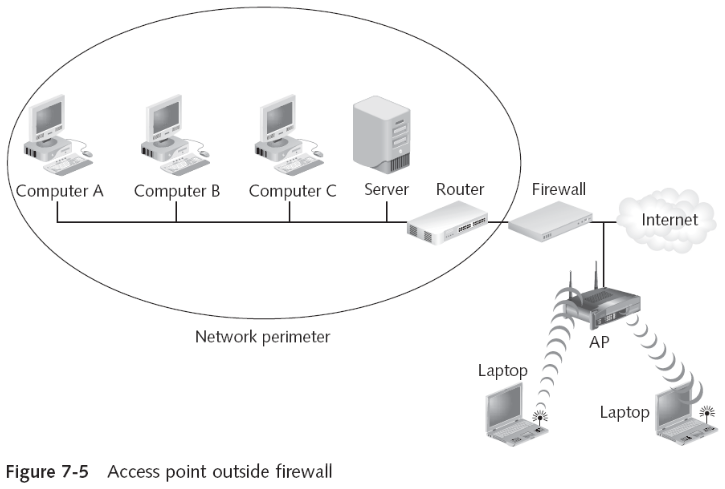
- Firewalls are a critical tool for protecting a wireless network from attacks
- Many security experts maintain that wireless APs should be treated as “unsecure”
- And placed outside of the firewall
- Stateful packet filtering
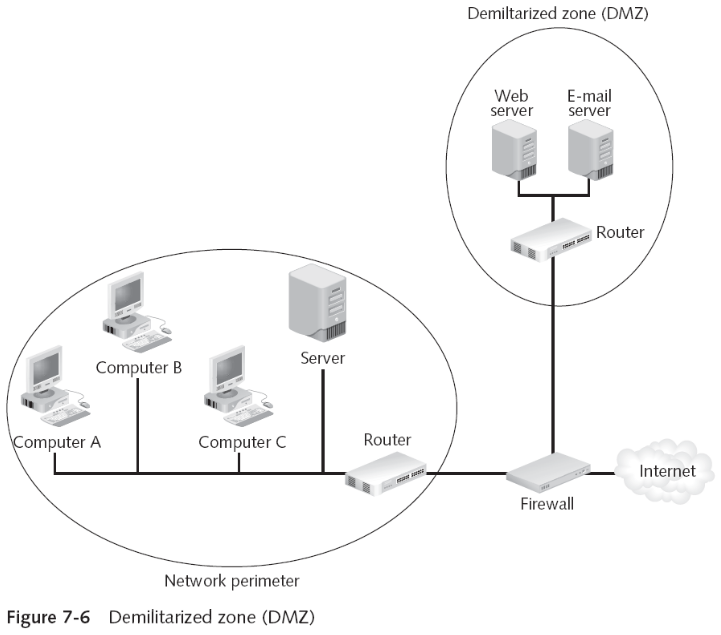
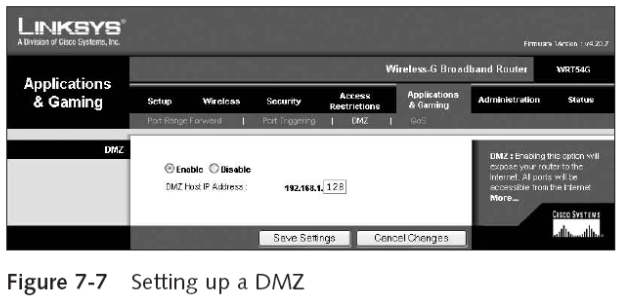
- Demilitarized zone (DMZ)
- Separate network that sits outside the secure network perimeter and is protected by a firewall
- Outside users can access the DMZ but cannot enter the secure network
- May not be practical for a SOHO network
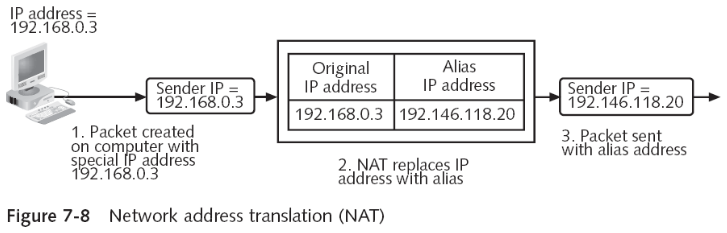
- Network address translation (NAT)
- Replaces the sender’s actual IP address with another IP address
- Private addresses
- Designed to be used only on a private internal network
- Network address translation (NAT)
- Private addresses
- Cannot be used on the Internet
- When using NAT, a private address is assigned to a network device
- And replaced with a real address when a packet leaves the network
- Port address translation (PAT)
- Each packet is given the same IP address but a different port number
- A single IP address is to be shared by several users
- Private addresses

- Network address translation (NAT)
- Advantages
- Security
- Conserves IP addresses
- Segmentation
- Disadvantages
- Difficult troubleshooting
- Problems with applications
- Issues with security protocols
- Performance impact
- Advantages
Segmenting by Virtual LANs (VLANs)slides 31–43
- Virtual local area network (VLAN)
- Logical grouping of network devices within a larger network
- Devices can be dispersed throughout the network
- How a VLAN works
- Unicast transmission
- Packet is sent to a single device
- Broadcast transmission
- Packet is sent to all network devices
- Unicast transmission
- How a VLAN works
- Broadcast domain
- Area in which a broadcast occurs
- Broadcasts can have an impact on network throughput as more devices send more broadcast transmissions
- Can be solved creating a VLAN
- The key to VLANs is the ability of the switch to correctly direct packets
- IEEE 802.1q
- Standard for marking VLAN packets
- Supports trunking
- Broadcast domain
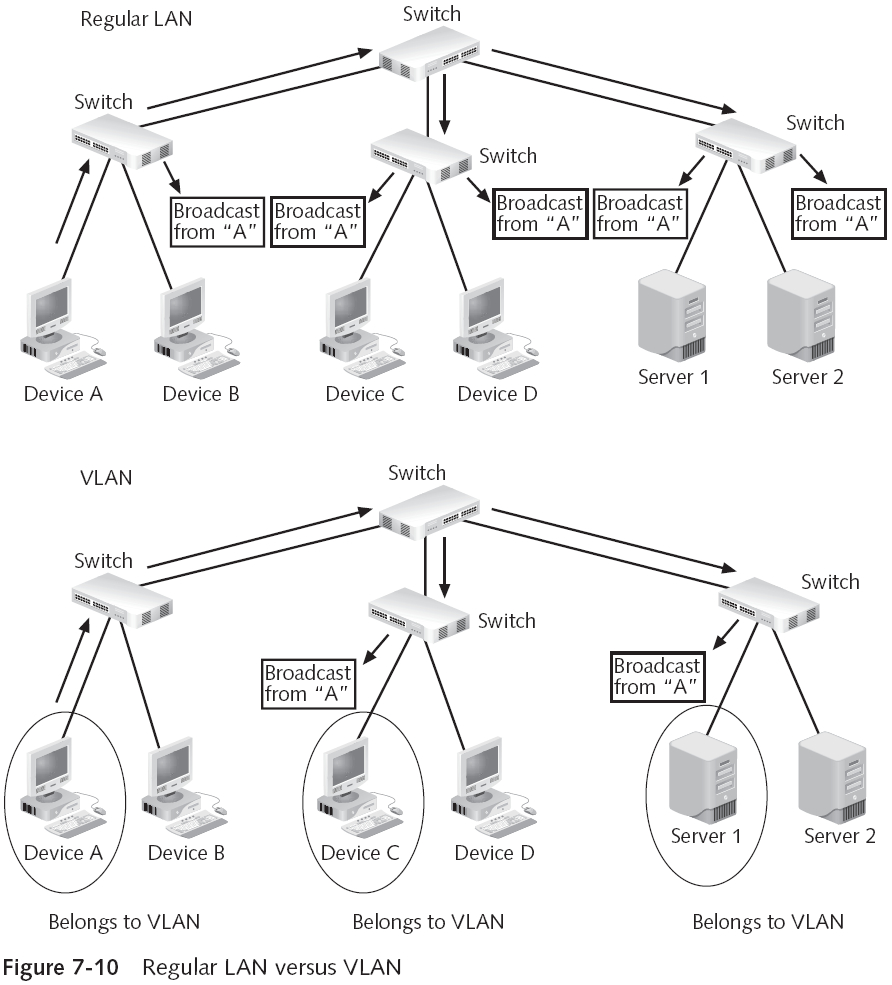
- How a VLAN works
- IEEE 802.1q
- Inserts a 4-byte “tag” header within the existing Ethernet packet
- Cisco Systems’ Inter-Switch Link (ISL)
- “Wraps” the original Ethernet packet with 30 bytes of additional information
- IEEE 802.1q
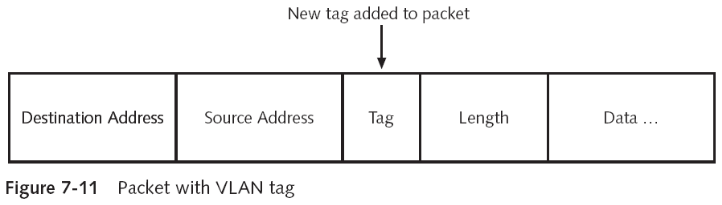
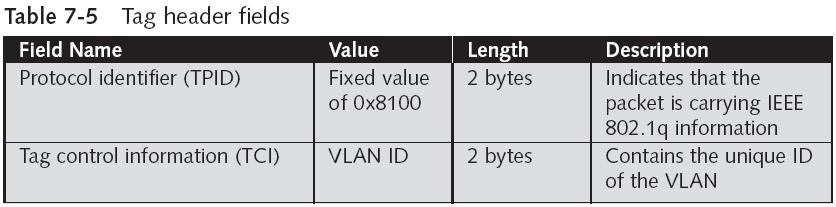
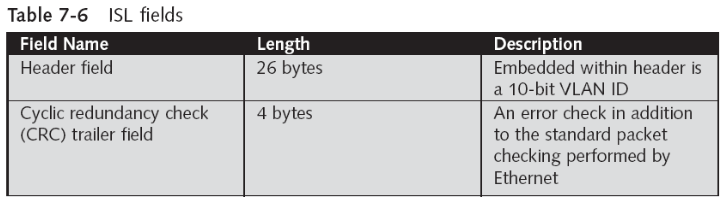
- Wireless VLANs
- Can be used to segment traffic
- Flexibility depends on which device separates the packets and directs them to different networks
- Switch-based configuration does not handle roaming users well
- AP-based configuration
- AP is responsible for separating the packets
- Different VLANs are transmitted by the AP on different SSIDs
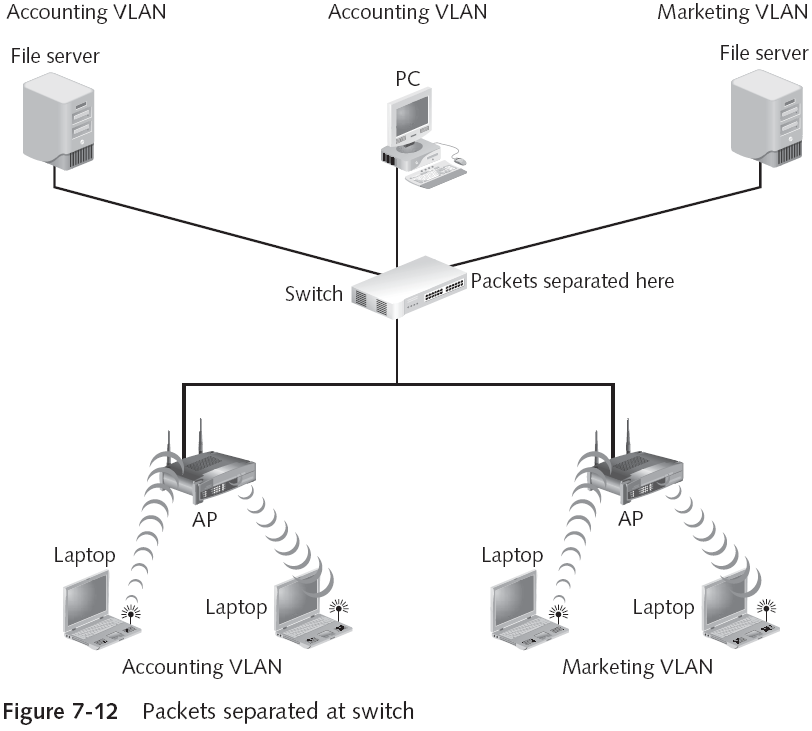
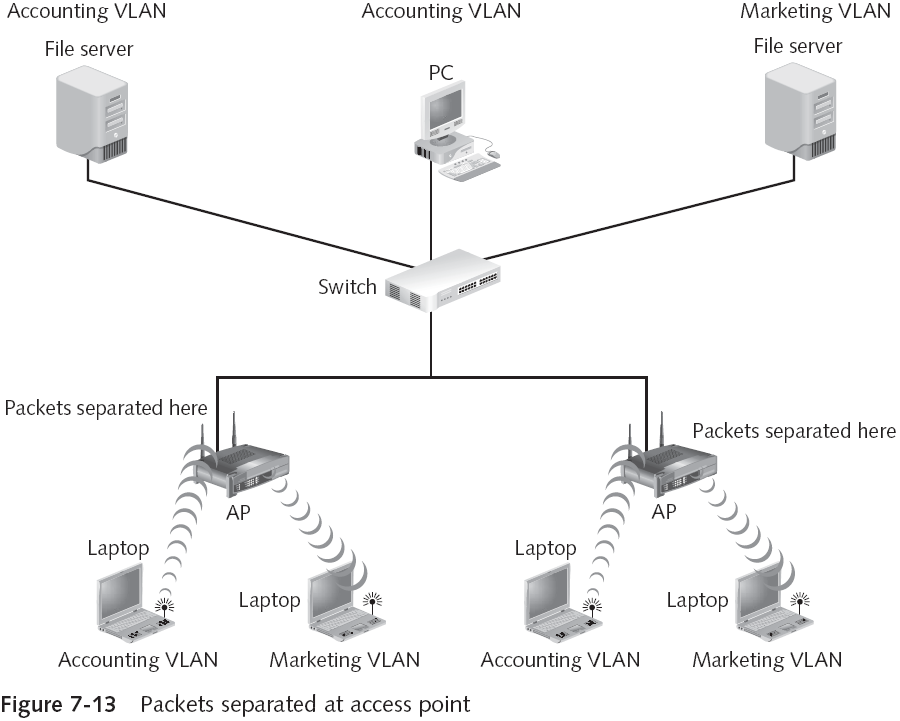
- Wireless VLANs
- Many organizations set up two wireless VLANs: employees and guests
- Wireless VLANs allow a single access point to service both VLANs

Hardware Placementslides 44–45
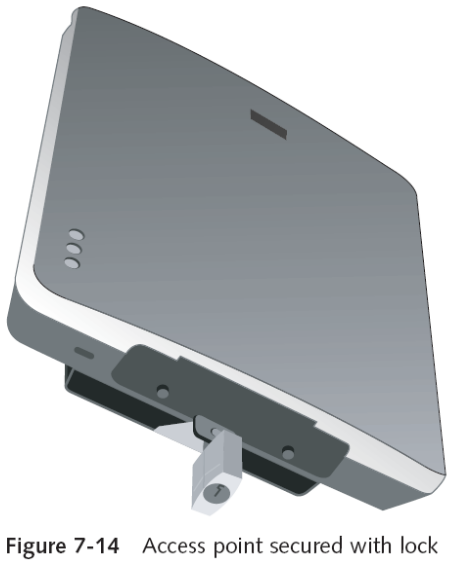
- Placing the hardware in a physically secure location is also important for security
- APs should be securely fastened to a wall, pole, or similar object to deter thieves
- Plenums
- Air-handling space above drop ceilings used to circulate and otherwise handle air in a building
- Placing an AP in a plenum can be a hazard
- Enclose AP within a plenum-rated enclosure to meet fire safety code requirements
Wireless Device Securityslide 46
- Security of the wireless devices themselves should not be overlooked
- Includes:
- Personal firewall
- Antivirus
- Antispyware
- Patch software
- Tools to identify new classes of attacks
Personal Firewall Softwareslides 47–48
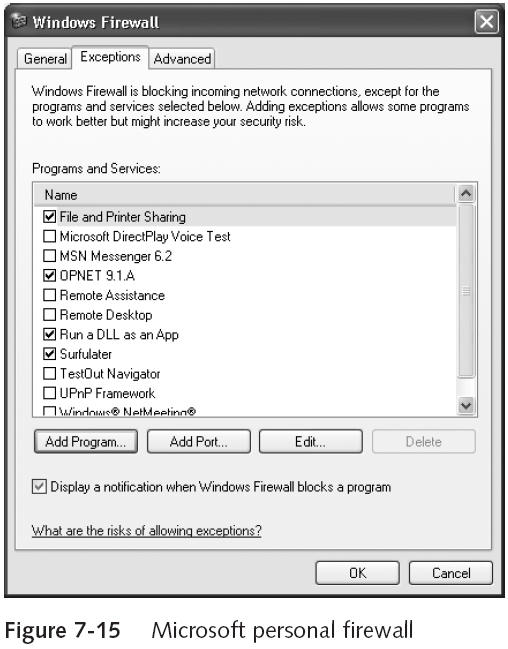
- Each wireless device should have its own software firewall installed
- Provides a “double layer” of protection
- Personal firewalls close and hide all unused ports
- Attackers cannot even see which ports to attack
- Use of ports is governed by a set of rules
- Personal firewalls also support outbound monitoring
Antivirus Softwareslides 49–51
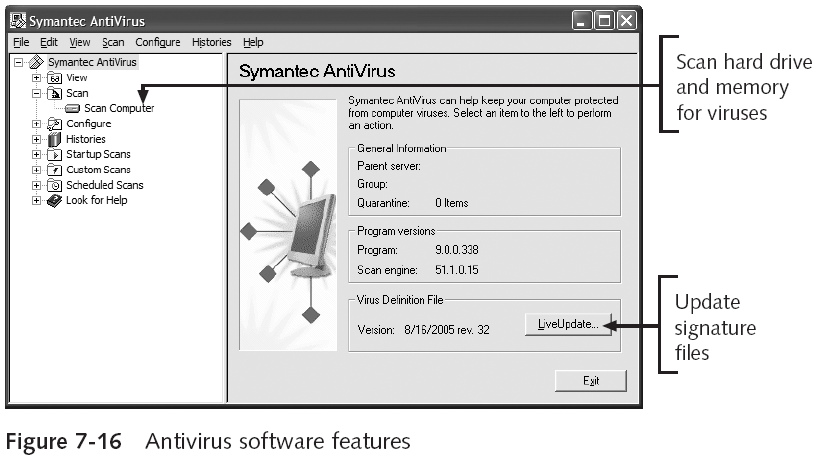
- Best defense against viruses
- Can scan a computer for infections and isolate any file that contains a virus
- Drawback
- Definition files or signature files must be continuously updated to recognize new viruses
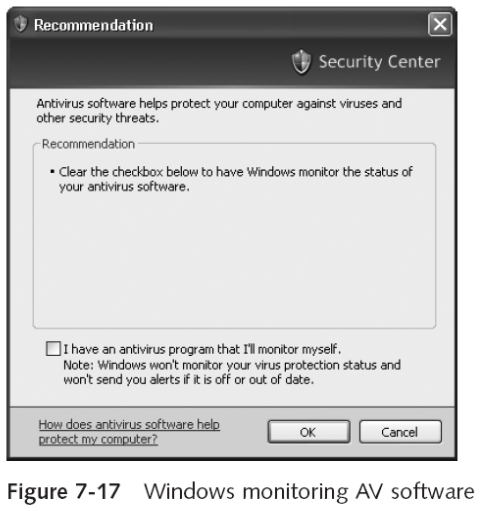
- Most antivirus software packages work with the Windows Security Center
- Central location to manage some security tools
Antispywareslide 52
- Helps prevent computers from becoming infected by different types of spyware
- Similar to AV software
- Must be regularly updated
- Provides continuous real-time monitoring and performs a complete scan
- Additional features
- Detailed information
- System explorers
- Tracks eraser
- Browser restore
Patch Softwareslides 53–55
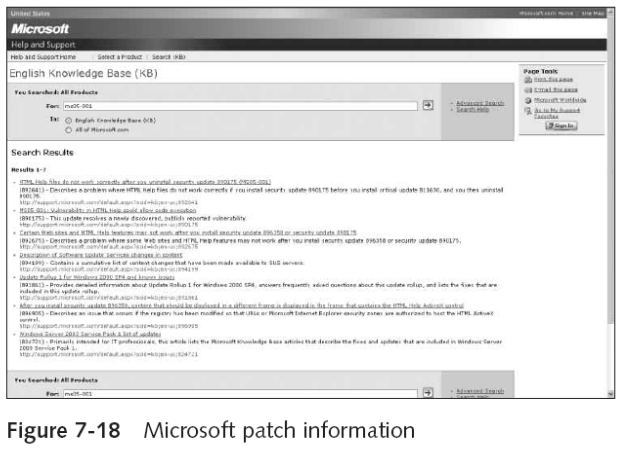
- Describes software security updates
- Provided by vendors for their application programs and operating systems
- Generally designed to fix security vulnerabilities
- Microsoft patch classifications
- Critical
- Important
- Moderate
- Low
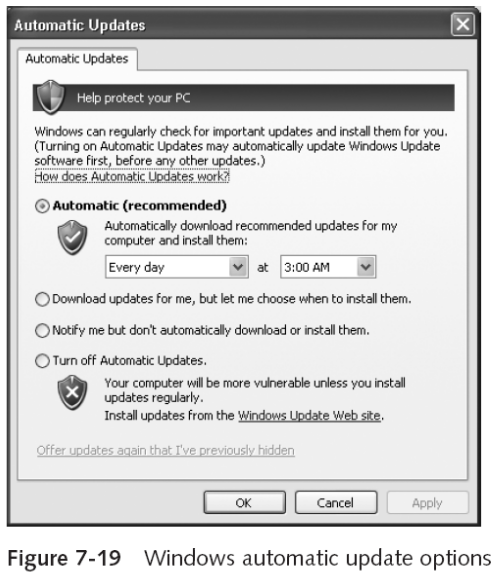
- Desktop computers can automatically receive Windows patches
Rootkit Detectorsslides 56–57
- Rootkit
- Software tools that attacker uses to break into a computer
- And obtain special operating system privileges
- To perform unauthorized functions and hide all traces of its existence
- And obtain special operating system privileges
- Includes several programs designed to:
- Monitor traffic, create a back door into the computer, change log files, and attack other network devices
- Software tools that attacker uses to break into a computer
- Rootkit itself causes no direct damage to computer
- Fundamental problem in detecting rootkits
- User can no longer trust the operating system
- Programs are available to help detect rootkit
- Disinfecting a computer that has a rootkit is difficult
- Most security experts recommend to reformat the hard drive and reinstall the OS
Quick review questions
- Explain the basic principles of security design
- What is network segmentation and how it can be used for WLANs
- List the ways in which wireless hardware can be located securely
- Describe the steps that can be taken to protect wireless devices
Summary of main teaching points
- Five security key principles
- Layering
- Limiting
- Diversity
- Obscurity
- Simplicity
- Segmenting a network has several advantages
- One of which is security
- A VLAN is a logical grouping of network devices within a larger network
- Security on wireless devices, such as laptops or PDAs, is also important
- Personal firewall software
- Antivirus software
- Antispyware software
- Patch software
- Rootkit detectors